Build servers & the Homerun Agent
Advanced mode: simple mode hides the Remote Hosts and Build Cache sidebar entries. Everything here keeps working either way, and a hidden page still opens from a link.
Services always deploy to this host's own Docker daemon. Placement across machines is swarm mode's job: a second machine joins the swarm as a worker rather than being registered separately, see Adding a server with one command.
A remote host is therefore a build server: somewhere a git-based service's image gets built instead of on this machine, then brought back here to run.
#Adding a server with one command
On /remote-hosts, Add a server (needs write access to Remote hosts) turns
any fresh Linux server into a build server, a swarm node, or
both. Pick the roles and an optional name, and Homerun hands you a command:
curl -fsSL https://<your instance>/api/v1/nodes/install.sh | sudo bash -s -- --token=hrn_...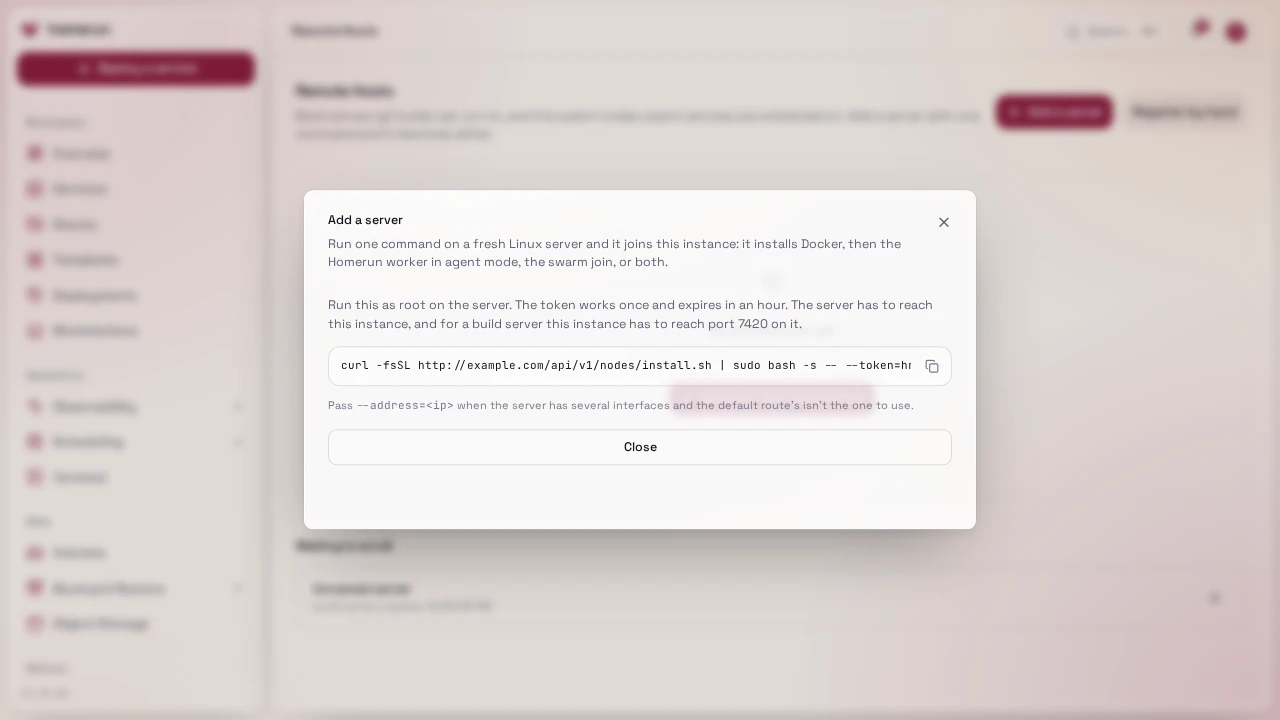
Run it as root on the server. It installs Docker, then:
- as a build server, installs the Homerun worker in agent mode (the same release as your instance) and registers it under Remote Hosts, named after the server unless you gave a name;
- as a swarm node, joins your swarm as a worker. Swarm nodes need swarm mode on (Settings → Docker).
The token works once and expires after an hour; pending ones are listed under
Waiting to enroll, where you can revoke them. The server has to reach your
instance, and for a build server your instance has to reach port 7420 on the
server. Homerun and the other nodes reach the server at its default route's
address; pass --address=<ip> when that's the wrong interface.
In swarm mode, the Swarm nodes table lists every node with its state,
address and resources. Removing a worker there moves its replicas to the other
nodes; run docker swarm leave on it afterwards.
Homerun doesn't add or remove servers by itself when load changes: you add capacity with the command above.
#Registering a build server by hand
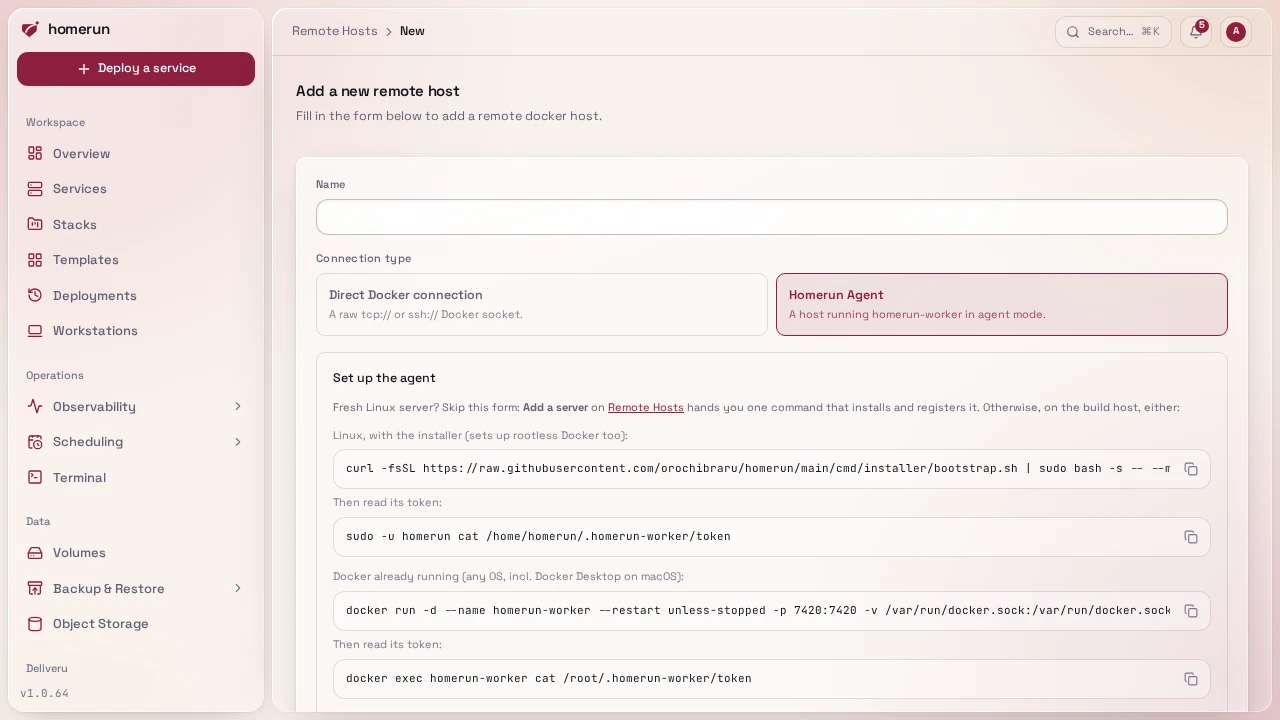
From /remote-hosts → Register by hand: a name, plus a connection type:
- Direct Docker connection:
tcp://host:port(+ optional TLS client cert for a secured Docker API), orssh://user@host, pointed at the target daemon directly. - Homerun Agent: a URL + bearer token for a host running the standalone
agent binary instead, see Homerun Agent below. The form
shows copy-ready commands to start the agent (the installer on Linux, or
docker runanywhere Docker runs, macOS included) and to read its token, pinned to your instance's release. Test connection checks the URL and token without saving; the token is verified again before the host is saved. This is the lighter-weight alternative that doesn't require exposing the Docker daemon itself.
Either kind builds: a Docker-connection host runs the build directly against
that daemon's Docker API, an agent host through its own POST /v1/build. Both
kinds, tcp:// and ssh:// alike, can also run
dev workstations, and a Docker-connection
host runs cron jobs too. Deleting a
host removes the workstations on it, their containers on that host included
(their home volumes stay).
#Direct Docker connection over SSH
An ssh://user@host[:port] address needs nothing on the host but an SSH server
and a user that can use Docker. This server's worker signs in with Homerun's own
SSH key, the one Machine terminals shows,
and reaches the daemon at /var/run/docker.sock through the SSH connection
(stream-local forwarding, on by default in OpenSSH). To set it up:
- Open Terminal and add Homerun's public key to the user's
~/.ssh/authorized_keyson that host. - Make sure that user can use Docker (
docker psworks as them, for example they're in thedockergroup). - Register the host with
ssh://that-user@host, adding:portwhen sshd isn't on 22. The user is required.
The first time anything uses the host (a build, a cron job, a workstation), Homerun connects once, checks the daemon answers and records the SSH host key it presented, the same key the host's machine terminal trusts. Every connection after that must present the same key; changing the host's address forgets it, and so does changing the host on its terminal card. One SSH connection per host is shared by every call to its daemon, reopened when it drops and closed after a few idle minutes.
The errors say what to fix: "refused Homerun's key" means the public key isn't
in that user's authorized_keys; "wouldn't connect to /var/run/docker.sock"
means sshd has stream-local forwarding off (AllowStreamLocalForwarding or
DisableForwarding), the daemon's socket is elsewhere (rootless Docker isn't
reached this way), or the user can't open it.
The same registration is available over the REST API (/api/v1/remote-hosts)
and as the Terraform provider's homerun_remote_host, see
Infrastructure as code.
/remote-hosts has a search box and a Connection-type filter (Docker
socket/Homerun Agent) once you have more than a couple registered, plus a pager
if you have more than a page's worth, searched/paginated server-side.
#Getting the image back here
The built image only exists on the build server's own daemon, so it has to reach
this host before the container can start. Two ways, picked by whether the
service has a build cache registry (a registry credential registered under
/build-cache-registries and picked in the service's
Environments & Deployments → Source
section):
- With a cache registry, the build pushes the final image there and this host pulls it back. The same registry doubles as the layer cache, so a repeat build reuses what the last one pushed.
- Without one, the image is streamed straight from the build server into
this host's daemon:
docker saveon the build server piped intodocker loadhere, through the Docker connection itself or the agent'sGET /v1/images/save. Nothing to set up, but every deploy transfers the whole image rather than only the layers that changed.
The git clone runs on the build server itself for both connection kinds (in a
throwaway alpine/git container on its daemon), so the repository has to be
reachable from the build server rather than from here. The build runs there too,
with BuildKit in a docker:cli helper container that mounts the build server's
/var/run/docker.sock (the agent uses its own DOCKER_SOCKET_PATH).
#Homerun Agent
Not a separate program any more: homerun-worker (cmd/worker/), the same
binary the app itself runs next to, picks agent mode whenever it starts with
no DATABASE_URL set. In agent mode it exposes git builds, dev workstations and
host stats over a small token-authenticated HTTP API, the alternative to
registering a build server by raw tcp:///ssh:// socket. Instead of exposing
(or SSH-tunneling into) the daemon itself, the build server runs the worker in
agent mode and the main app talks to it over plain HTTP with a bearer token,
this is what the "Homerun Agent" connection type on /remote-hosts (above)
registers.
go run ./cmd/worker # from the repo root; agent mode as long as DATABASE_URL is unset, talks to /var/run/docker.sock by defaultOr compiled to a standalone binary (no Go toolchain needed on the target host):
bun scripts/build-packages.ts (builds the CLI/installer/worker binaries for
both arches). On first boot with no WORKER_TOKEN set, it generates one and
prints it, copy that plus this host's reachable URL into /remote-hosts's "new
host" form, see cmd/worker/README.md for the full
env var and HTTP surface reference, plus install options (a Docker image, a
prebuilt binary, or the installer below).
Wired into the main app: registering an agent-kind build server and picking it in a git-based service's Environments & Deployments → Source section routes that service's builds through this agent's HTTP API instead of a raw Docker connection. An agent host can also run dev workstations: pick it under Runs on when creating one, the same as a Docker host.
#Installer
cmd/installer/ automates standing up a fresh Linux box with either the full
stack, on the system Docker daemon as a swarm manager (or on rootless Docker in
standalone mode with --docker=rootless), or the Agent alone, on its own
rootless daemon. This is what docs/getting-started.md's one-liner runs, and
--migrate-to-rootful moves an older rootless install onto the system daemon in
swarm mode. See cmd/installer/README.md for
flags and what's verified.
A separate script, cmd/installer/swarm-join.sh, joins a box to an existing
Homerun swarm as a worker and installs the Homerun Agent there (through the
installer's --mode=agent). This is how you add capacity: the swarm scheduler
places workloads on the new node automatically. Registering it as a build server
(above) is separate and only needed if you also want to build there. Run it with
the join token/manager address from docker swarm join-token worker on your
manager:
curl -fsSL https://raw.githubusercontent.com/orochibraru/homerun/main/cmd/installer/swarm-join.sh \
| sudo bash -s -- --token=<SWMTKN-...> --manager=<ip>:2377The node joins on the system (rootful) Docker daemon, same as the manager
runs on (see swarm mode): rootless Docker can't create the
overlay networks swarm services use. Nodes need to reach each other on 2377/tcp,
7946/tcp+udp and 4789/udp. On a host with several network interfaces add
--advertise-addr=<ip>. Verified against two real disposable VMs: the worker
joins, replicas get scheduled on it and Traefik on the manager serves them over
the overlay network.
This guide lives in the project repo: edit it there, and this page follows within a day.