Importing a compose file
Import compose on the services list takes a docker-compose.yaml pasted
straight in and turns it into Homerun rows. Parsing happens on the server and
nothing is created until you confirm: the preview lists every service it found
with the image, port, protocol, network mode, env var count and volume mounts it
resolved, plus a warning for anything it had to drop.
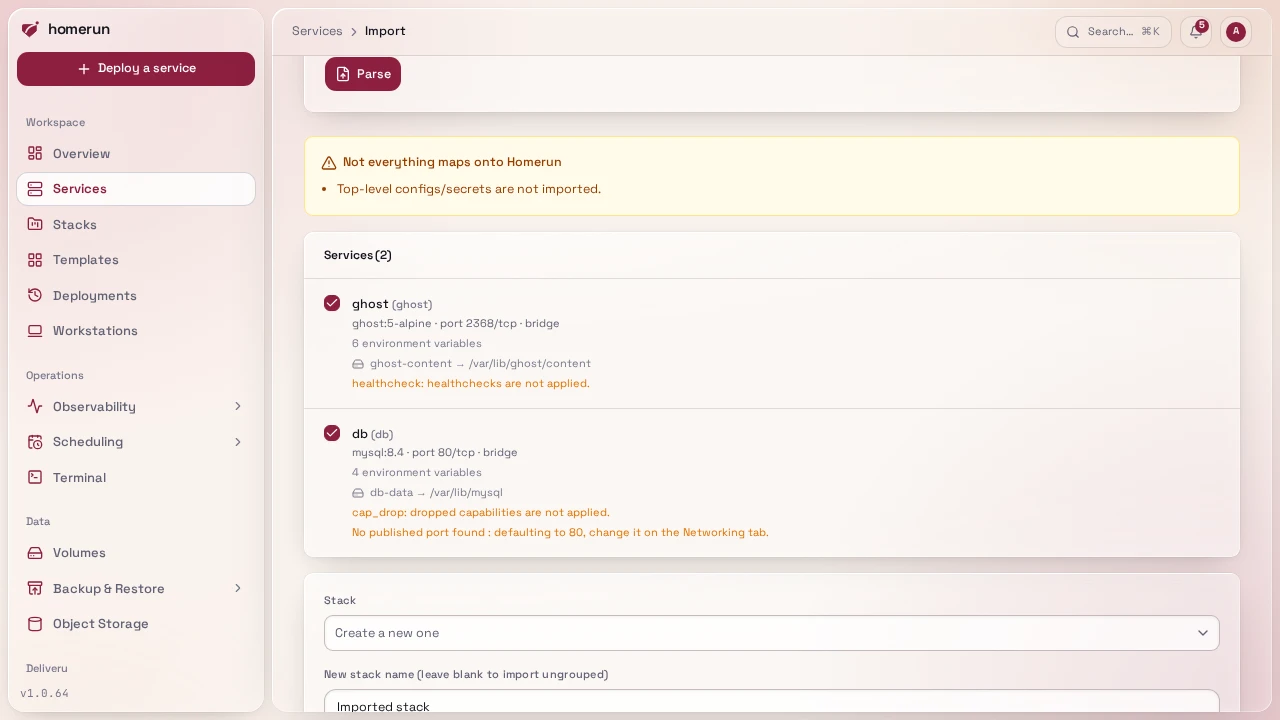
What maps across: image, environment (both the map and the KEY=VALUE list
form), ports/expose (the first port becomes the container port Traefik
routes to, every other host mapping becomes a
published port, port ranges are skipped),
restart, volumes (named volumes and absolute bind mounts, in both the short
src:dst:ro and long type:/source: forms), depends_on,
network_mode: host, container_name, deploy.resources.limits.cpus/memory,
and everything under Container → Runtime:
command and entrypoint (string or list form), labels (Traefik and
homerun.* labels are dropped, Homerun writes its own routing), user,
cap_add, devices and privileged.
env_file is resolved into env vars where it can be: the preview asks you to
paste the contents of every relative env file the compose file references, and
their variables are imported (the service's own environment wins on a clash).
An absolute path you don't paste is kept as an env file
and read from the host at every deploy. A relative one left blank is skipped.
What comes back as a warning instead of being applied: build: (import it, then
point the service's Environments & Deployments → Source section at a git
repository), healthcheck, cap_drop, extra_hosts, sysctls, tmpfs,
secrets/configs, relative bind mounts (Homerun needs an absolute host path), and
anonymous volumes.
Every named volume and absolute bind mount becomes a
storage volume (reusing an existing one when the source
matches) and is mounted into the service at its declared path. A service that
published a host port gets a public <slug>.<domain> route; one that only
exposed a port stays internal. You can drop individual services from the
import, put them in a new or existing stack, and optionally deploy everything
straight away, in depends_on order. Each depends_on between imported
services is kept as a recorded dependency, so later starts and stack deploys
follow the same order (see Env vars).
This guide lives in the project repo: edit it there, and this page follows within a day.