API & CLI
#REST API
/api/v1/* is a thin, typed JSON wrapper over the same DTO layer the dashboard
itself is built on: not a separate abstraction. Every route checks its own auth
independently (a cookie session, or x-api-key/Authorization: Bearer <key>
from your profile page), so the same handlers serve the dashboard's own requests
and external API-key clients alike.
Every route belongs to one permission area
(services, stacks, DNS and so on): a GET needs read access to it, a POST,
PATCH or DELETE needs write access. A request from an account or API key
without it answers 403 with an error naming the area, such as
{"error": "You don't have permission to change Services."}. An API key is
created with the permissions you pick, an expiry and, optionally, "all
permissions" (see API keys), and is always limited
to what its owner holds at that moment. A banned account's keys are refused with
a 403 until the ban is lifted or runs out. Profile, CLI login, the API docs
and the MCP endpoint are open to any signed-in account. An API key makes up to
3000 requests a minute; past that it gets 429 Too Many Requests with a
Retry-After header (in seconds) until the minute is up. The OpenAPI spec lists
that 403 on every route.
The Terraform state routes under /api/v1/iac/projects/:id/ (state and
lock, see Terraform state) also
take the key as an HTTP Basic password, with any username, since that's the only
credential Terraform's http backend sends. They need write access to
Infrastructure as code (and read for GET).
GET/POST /api/v1/services,GET/PATCH/DELETE /api/v1/services/:id: a create or update adding a domain something else already routes answers409withconflicts, each{domain, owner, ownerKind, ownerId, canTakeOver}, and takes"takeOverDomains": trueto move them from another service or a redirect (see Domains); delete answers409while a job is queued or running for the service, and takes?force=trueto cancel those jobs and drop Homerun's record even when the container or swarm service couldn't be removed, the API equivalent of the Settings tab's Force delete and Delete anywayPOST /api/v1/services/:id/{deploy,start,stop,restart}:deployawaits the full pull-or-build → create → start pipeline and returns once it's done (no separate polling endpoint for API clients: that's dashboard-only, for its own progress UI); with release channels on,{"environment": "canary"}deploys the canary instead (stable, the default, deploys the service itself)GET/PATCH /api/v1/services/:id/channels: a git service's release channels, the canary branch, tag pattern, canary domain and canary service;PATCHtakesenabledplus any ofbranch,tagPatternandcanaryDomain(null clears it), and turning them off deletes the canaryGET/PUT /api/v1/services/:id/dependencies: what a service depends on and what depends on it, each with itsid,name,slugandsource:recorded(a stored dependency, the only kind that sets start order),env(an env value points at the other's slug as a host) orboth.PUT {"dependsOn": [ids]}replaces the recorded ones (an empty list clears them) and leaves env vars alone; an unknown id, the service itself or one that already depends on it is a400GET /api/v1/services/:id/logs: the service's container or swarm service logs as plain text, the last?tail=lines (default 200, max 10000), or a live stream with?follow=true; a400for a service that was never deployedGET /api/v1/services/:id/webhook: the push-to-deploy payload URL and secret for that service, whether the branch is polled instead and which provider to reconnect when it refused the webhook, a 404 when none of Deploy on push, pull request previews or release channels are onDELETE /api/v1/auth-token: revokes the API key that authenticated the request, whathomerun logoutcalls (see Logging in below)GET/POST /api/v1/stacks,GET/PATCH/DELETE /api/v1/stacks/:id(delete removes the stack's services too,?force=truelike a service's),GET /api/v1/templates,GET /api/v1/templates/:idGET/POST /api/v1/services/:id/scans,GET /api/v1/services/:id/scans/latest,GET /api/v1/services/:id/scans/:scanId: image scan results, see Image scans belowGET /api/v1/services/:id/revisions,POST /api/v1/services/:id/revisions/:revisionId/deploy: revisions and rollback, see Revisions belowGET /api/v1/services/:id/deployments?limit=10: the latest deploy attempts, failed ones included, each with its error and progress log (up to 50); these and revisions carry theenvironmentthey deployed (production,canary,preview, or the service's ownenvironmentName, see Release channels), and each deploy attempt itstrigger(manual,cron,push,promote,rollback, or null for a deploy from before triggers were recorded)GET/PATCH /api/v1/services/:id/version: an image service's version pin and update checks, flat:tag,pinnedFromTag,pinnedLocally, the watch switches (updateCheckEnabled,updateTrialEnabled, whichPATCHtakes) and what the last check found (availableTag,checkError,trialStatus,trialMessage…). Turning the watch on runs the first check, off forgets the last one.GET /version/pinlists the registry tags matching the running image (matches) and a tag to make on this host (suggestion);POST /version/pin {"tag": "1.25.3"}pins ("local": truetags the running image on this host),DELETE /version/pinunpins;POST /version/checkchecks now (a502when the registry can't be read) andPOST /version/updatemoves the service onto the update found and queues its deploy (202,409with nothing to apply). A git service, or an environment, preview or canary, is a400GET /api/v1/monitoring?range=weekandGET /api/v1/services/:id/monitoring?range=week: requests, errors and response time, uptime probe availability, CPU and memory overtoday,week(the default),month,yearorall(?zone=an IANA time zone for where today starts, UTC by default), with the previous period's totals; the instance's lists each service's share, a service's adds the latest 30 beats of its internal and external uptime probesGET /api/v1/system/logs?limit=100: Homerun's own warnings and errors, newest first (up to 500);GET /api/v1/system/containersandGET /api/v1/system/containers/:id/logs?tail=200: the instance's own containers (app, worker, Traefik, Postgres…) and their latest log lines.GET /api/v1/system/docker-cleanuppreviews what each prune would remove,POST /api/v1/system/docker-cleanup {"action": "pruneImages", "all": true}queues one (pruneContainers,pruneImages,pruneNetworks,pruneBuildCache,pruneVolumes,pruneSystem,pruneMirrororreclaimStackNetworks) and answers202with itsjobId. All of these need the System permissionGET /api/v1/jobs/:jobId: the status of a queued job, such as a scanGET /api/v1/jobs?status=running,queued: jobs by status (comma-separated; every job without it), running first, each with its service's name, stage, worker lease and astaleflag (executing with no worker heartbeat for over two minutes); needs the System permissionGET /api/v1/system-stats: host CPU/RAM/disk/GPUGET/POST /api/v1/instance/update: the running version, the latest release and whether an update can start (with the jobs in the way inpreflight.blockers), and starting one ({"force": true}to update over those jobs), see Upgrading; needs the Settings permissionGET /api/v1/instance/update/progress: the update helper's state and output, to follow a running update; needs the Settings permission
The list GETs (services, stacks, templates, jobs, a service's scans)
are paginated: ?page=, ?perPage= (default 100, max 200), and ?q= for a
case-insensitive search. The response body stays a plain JSON array, on purpose,
so an existing integration keeps working unchanged; the total row count and the
page/size you got back come in the x-total-count/x-page/x-per-page
response headers instead. Both the OpenAPI spec and the CLI (below) document
these the same way.
#Everything the dashboard manages
PATCH /api/v1/services/:id takes every setting a service's tabs have, each
field optional (the rest stay as they are), and checks and applies them the way
the dashboard does: domains and their DNS records, a custom certificate
(customSslCert and customSslKey, null on both removes it), published ports,
the login wall and its paths, previews, release channels (channelsEnabled,
channelBranch, channelTagPattern, channelCanaryDomain), the redeploy
schedule, compute, healthcheck, runtime and the rest. POST /api/v1/services
takes the same fields on top of the ones a new service needs, and with
templateId creates the service (and the template's linked services) from a
template first. Every other object has its own routes, each with create, read by
id, update and delete, each with a UUID as its id (a bucket's is
<storeId>/<name>, a DNS record's <domainId>/<recordId>). Secrets are
accepted and never returned: a response says whether one is set instead
(registryPasswordSet, customSslSet, passwordSet and so on). Env vars come
back as stored, with secretEnvKeys (a service's and a cron job's) naming the
ones marked secret, which the dashboard masks and the MCP server redacts.
| Object | Routes |
|---|---|
| Stack | /stacks, /stacks/:id |
| Service | /services, /services/:id |
| Service environment | /service-environments, /service-environments/:id |
| Service dependency | /service-dependencies, /service-dependencies/:id (no update) |
| Volume | /volumes, /volumes/:id |
| Volume mount | /volume-mounts, /volume-mounts/:id |
| Cron job | /cron-jobs, /cron-jobs/:id, plus POST /cron-jobs/:id/run (queue a run now), GET /cron-jobs/:id/runs (latest runs) and GET /cron-jobs/:id/runs/:runId (one run with its output) |
| Redirect | /redirects, /redirects/:id |
| Notification channel | /notification-channels, /notification-channels/:id (the caller's own) |
| Notification | GET /notifications (the caller's own feed, ?unread=true for the unread ones), POST /notifications/read (one by id, or all) |
| Backup destination | /backup-destinations, /backup-destinations/:id |
| Status page | /status-pages, /status-pages/:id |
| DNS connection | /dns-connections, /dns-connections/:id (DNS area) |
| Domain | /domains, /domains/:id (DNS area) |
| DNS record | /domains/:domainId/records, /domains/:domainId/records/:recordId, read and written live at the domain's provider; an update can change the record's id (DNS area) |
| Remote host | /remote-hosts, /remote-hosts/:id (Remote hosts area) |
| Workstation | /workstations, /workstations/:id (the caller's own; desiredState starts or stops it, POST /workstations/:id/recreate recreates its container, authRequired and the auth* lists are its login wall, DELETE ?volume=true also deletes its home volume; Workstations area) |
| Workstation preset | /workstation-presets, /workstation-presets/:id (the caller's own, login wall fields included; Workstations area) |
| Git provider | /git-providers, /git-providers/:id (Git providers area) |
| Build cache registry | /build-cache-registries, /build-cache-registries/:id |
| Object store | /object-stores, /object-stores/:id (Object storage area) |
| Bucket | /object-stores/:storeId/buckets, /object-stores/:storeId/buckets/:name (Object storage area) |
| Template | /templates, /templates/:id (read only) |
| Registry token | /registry/tokens, /registry/tokens/:id (no update; the secret is only in the create response; Docker Registry area) |
| Instance settings | GET/PATCH /instance/settings (General, Docker, Networking), /instance/smtp, /instance/tls, /instance/error-pages, /instance/ip-bans (Settings area) |
| Authentication settings | GET/PATCH /authentication/settings (Users & authentication area) |
| User | /users, /users/:id (people only, service accounts have their own routes; refuses demoting or deleting the last admin and deleting yourself; Users & authentication area) |
| OAuth provider | /oauth-providers, /oauth-providers/:name (the name is the id; checks the discovery URL on every save; Users & authentication area) |
| OIDC app | /oidc-apps, /oidc-apps/:id ("Sign in with Homerun" apps; created with no environment; a public app takes no token auth method and always requires PKCE; Users & authentication area) |
| OIDC app environment | /oidc-apps/:appId/environments, /oidc-apps/:appId/environments/:id (callback URLs and authorized origins, checked like the dashboard; the last one can be deleted here) |
| OIDC app secret | /oidc-apps/:appId/secrets, /oidc-apps/:appId/secrets/:id (confidential apps; no update; the value is only in the create response) |
| Registry settings | GET/PATCH /registry/settings, waits for the registry's container to be recreated (Docker Registry area) |
| Registry images | GET /registry/repositories (paged, q matches the name) and GET /registry/repositories/:repository/tags, read only: deleting a tag or a repository stays on the dashboard (Docker Registry area) |
This is what the Terraform provider is built on, and the CLI has a command group for each, see Everything else the API manages.
#Image scans
A service's image scans are readable over the API:
GET /api/v1/services/:id/scanslists them newest first, without findings:id,deploymentId(null for an on-demand scan),imageRef,digest,status(ok,failed,skipped),countsper severity,fixableCounts(findings with a fixed version,nullon older scans),totalFindings,scannedAt, anderrorfor a scan that didn't produce findings.GET /api/v1/services/:id/scans/latestandGET /api/v1/services/:id/scans/:scanIdreturn one scan with itsfindings(top 200, most severe first).latestis a 404 until the service has been scanned once.POST /api/v1/services/:id/scansqueues a scan of the deployed image, the same as the Security tab's Scan now, and answers202with ajobId. It's a400for a service that was never deployed, and a409(with the in-flightjobId) when a scan of that service is already queued or running. PollGET /api/v1/jobs/:jobIduntil itsstatusissucceeded,failedorcancelled, then readscans/latest.
Every account sees every service's scans and jobs; an unknown id is a 404.
#Revisions
GET /api/v1/services/:id/revisionslists the revisions among the last 50 deploys that reached running, one entry per revision, newest first by when it was first deployed. A rollback doesn't add an entry, it updates the revision it redeployed. Fields:id(the revision's original deployment, what the deploy endpoint below takes),imageRef,imageDigest,imageId,buildSource,gitCommit,gitRef,status,createdAt(first deployed),lastDeployedAt(last went live),latestDeploymentIdandredeployCount,healthof its latest run (watchingandhealthyonly on the current revision,unhealthyandrolled_backkept as history, otherwise null),healthReason(why it was judged unhealthy, such as the failing swarm tasks' error, otherwise null), plus three markers:current(running now),previous(the default rollback target) andretained(its image is kept on the host).POST /api/v1/services/:id/revisions/:revisionId/deployredeploys that revision's image without building, pulling from upstream or scanning, and likedeployreturns once it's done. Usepreviousas therevisionIdfor the default target, and add?restoreConfig=trueto also restore the env vars, resources and networking that revision ran with. A404means no such revision for that service, a400that there's no previous revision with a different image.
PATCH /api/v1/services/:id also takes autoRollback, requireStatusChecks
and requiredStatusChecks (see Required status checks),
plus healthcheckCommand, imageScanEnabled and uptimeEnabled (turns the
service's uptime probes on or off).
#Previews
The open pull request previews of a service, for CI to create (image-based services) and test against (see Testing pull requests with GitHub Actions):
GET /api/v1/services/:id/previewslists them, newest pull request first, andGET /api/v1/services/:id/previews/:prNumberreturns one (404when that pull request has none). Fields:id(the preview's own service id),prNumber,title,branch,gitRef(the head SHA a git preview builds, null for an image-based one),status,hostnames,url,revision(the revision it runs now:id,gitCommit,imageRef,imageDigest,health,healthReason,deployedAt, or null) anddeployment(its latest deploy attempt, failed or in flight included:id,status,gitCommit,errorMessage, or null).PUT /api/v1/services/:id/previews/:prNumbercreates or updates the preview of an image-based service from the image CI just pushed. The body is{"tag": "<tag>"}plus optionalcommit(recorded on the preview's revision, whatpreviews wait --commitand the promotecommitmatch),branch(checked against the preview branch filter) andtitle. A new preview gets the service's preview settings and runs its image attag; an existing one switches totagand redeploys, without copying volumes again. It answers202with the same fields asGETplusdeploymentIdonce the deploy is queued,400for a git service (its previews come from the webhook) or a preview, and409when previews are off, the branch doesn't pass the filter (an existing preview of it is deleted), the preview's slug is taken or the instance is out of capacity.DELETE /api/v1/services/:id/previews/:prNumberdeletes it, like the Delete button in Environments & Deployments → Previews (409when its container couldn't be removed). An image-based service's CI calls it when the pull request closes, since no webhook does.POST /api/v1/services/:id/previews/:prNumber/promotedeploys the image the preview runs to the service itself (an image-based service ends up on the preview's tag), the way a rollback redeploys a revision: no build, no pull from upstream, no scan. An optional{"commit": "<sha>"}body refuses (409) unless the preview runs that commit; it's also a409while the preview has no running revision or its health check is still running or failed. The deploy's trigger ispromote, notrollback, so auto-rollback watches it like any new revision. It answers202withdeploymentId,jobId(pollGET /api/v1/jobs/:jobId),revisionId,imageRefandgitCommit.
#Errors
For a service with error tracking on,
GET /api/v1/services/:id/errors lists its issues (?status=unresolved, the
default, resolved, ignored or all, q to search, sort by lastSeen,
firstSeen or count, and the usual paging),
GET /api/v1/services/:id/errors/:issueId returns one issue with its latest
event (stack trace, source context, request, tags, breadcrumbs), and PATCH on
it with {"status": "resolved" | "ignored" | "unresolved"} changes its status.
The MCP server exposes the same as list_errors and get_error, and the CLI as
homerun services errors <id>, homerun services errors get <id> <issueId> and
homerun services errors resolve <id> <issueId>. GET, POST (multipart) and
DELETE ?release= on /api/v1/services/:id/sourcemaps list, upload and delete
a release's source maps.
#Backups and jobs
GET /api/v1/volumes lists storage volumes with their backup settings and next
scheduled run (?backup=on for only the ones with backups on),
POST /api/v1/volumes/:id/backup queues a backup now and answers 202 with its
jobId, and GET /api/v1/backups lists every backup and restore run, newest
first (?volume=<id>, ?outcome=running|success|failed,
?kind=backup|restore, q and the usual paging), each with its job's status,
attempt count and jobProgressAt. GET /api/v1/jobs/:id returns a job's
status, attempts, heartbeat, progressAt and full log: a running job whose
progressAt stops moving is stuck. The MCP server exposes these as
list_volumes, list_backups, run_backup, get_job and list_jobs, the CLI
as homerun backups list|volumes|run and homerun jobs list|get;
homerun backups run <volume> --wait follows the backup's log until it ends.
#OpenAPI spec & Swagger UI
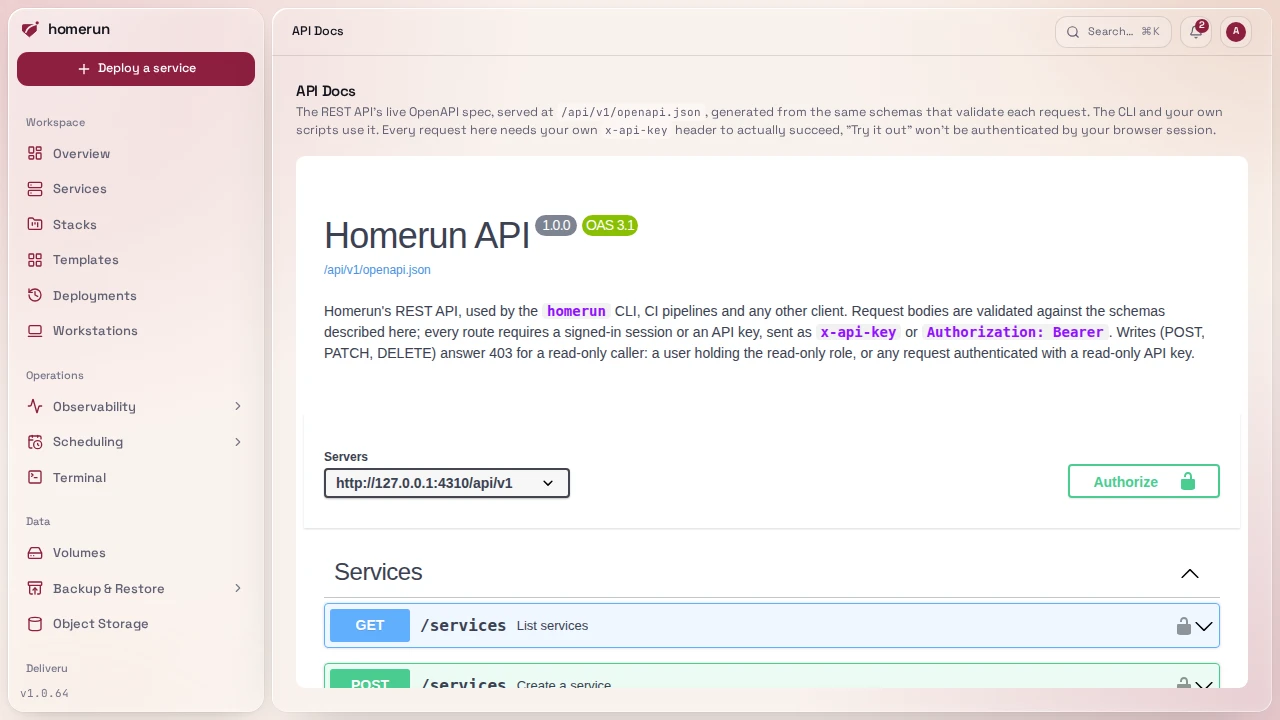
GET /api/v1/openapi.json is a real, generated OpenAPI 3.1 document:
public/unauthenticated (it describes shapes, not data; every route it documents
still enforces its own auth). Request bodies come straight from the zod schemas
that validate each request at runtime, so the spec can't silently drift from
what the API actually accepts.
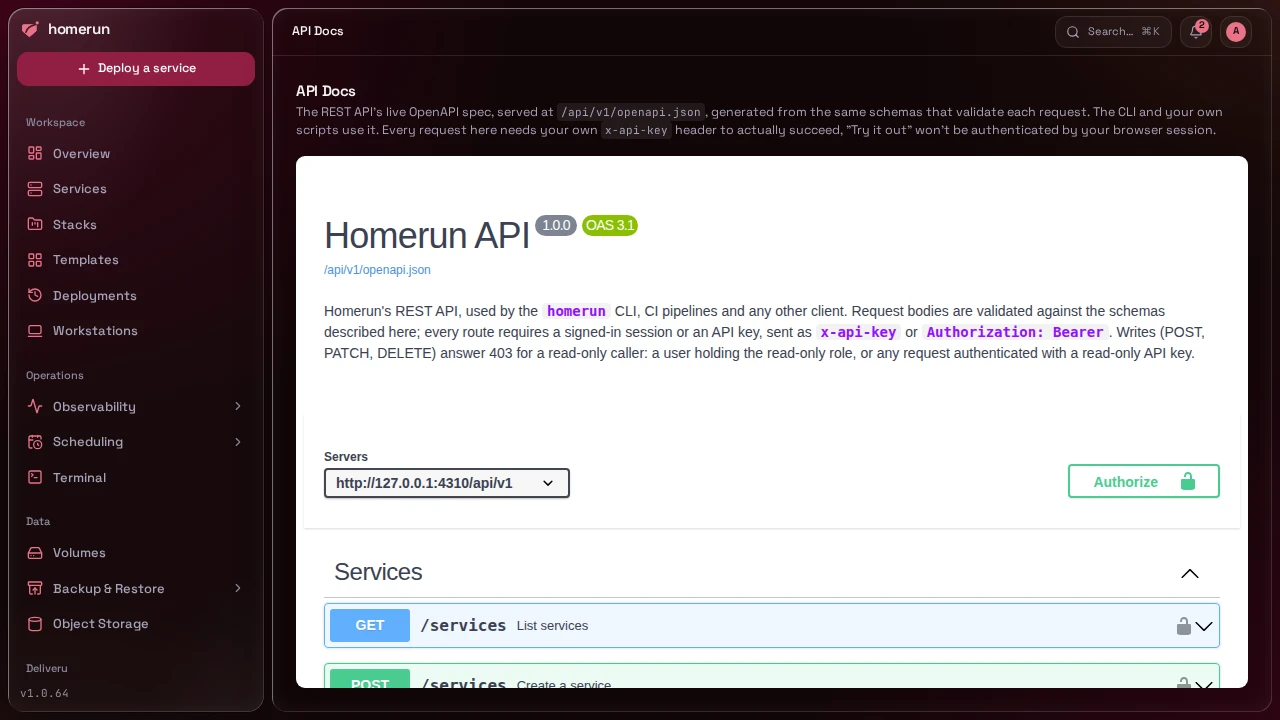
The API Docs page in the dashboard (own nav item) renders that spec with a
self-hosted Swagger UI: no outbound internet needed to view it. "Try it out"
from that page makes its own unauthenticated fetch calls (it doesn't share
your dashboard session), so paste an API key there to actually exercise a
request.
#MCP server for AI agents
Homerun also serves an MCP server at https://<your dashboard>/api/v1/mcp, so
an AI agent can diagnose and fix your services with the same permissions as the
API. Connecting an agent, the tools it gets and how secrets are kept from it are
on their own page: MCP server for AI agents.
#CLI
A CLI (cmd/cli/) against the API above. It's a small, standalone Go binary
(around 6MB) with no runtime to install, rather than the old Bun build that
shipped a whole embedded runtime for the same job.
#Install
One command: it detects your arch, downloads the matching release binary, and
drops it at /usr/local/bin/homerun (Linux or macOS, no Bun or build step
needed):
curl -fsSL https://raw.githubusercontent.com/orochibraru/homerun/main/cmd/cli/install.sh | bashhomerun update re-runs that from inside the binary, replacing itself with the
latest release; homerun update --channel canary (or nightly) follows those
builds instead (install one with install.sh --version=canary or
--version=nightly, which pick the newest build on that channel). It never
downgrades. homerun --version tells you what you have.
#Logging in
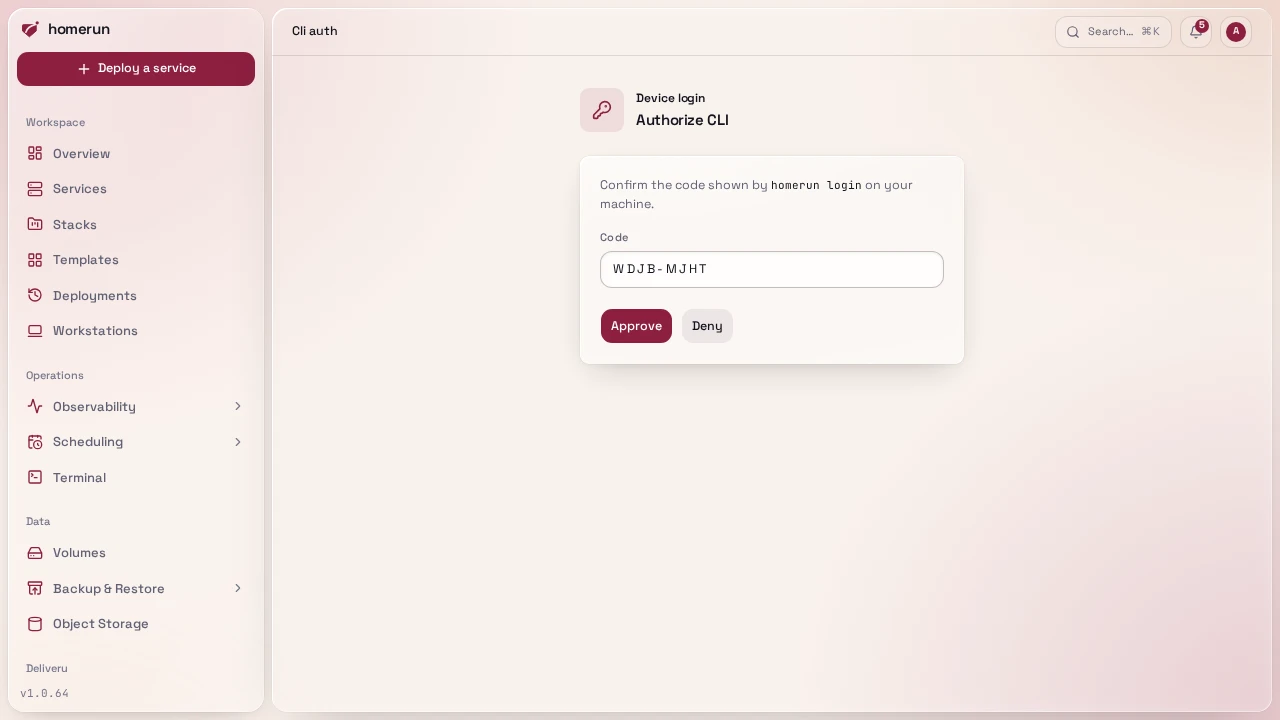
homerun login --base-url https://your-instance.example.comThis is a device-code flow: the CLI prints a short user code and a URL, you
open that URL in a browser where you're already signed in to Homerun, approve
the request, and the CLI picks up an API key of its own. It's saved to
~/.config/homerun/config.json (mode 0600) alongside the instance URL, so
every later command just works with no flags.
homerun logout revokes that API key on the server, then clears the local file
regardless of whether the server call succeeded (an unreachable instance or an
already-invalid key never blocks logging out locally). Approved CLI clients are
also listed under Profile → API Keys in the dashboard, where you can revoke
one directly.
If you'd rather not use the device flow, generate an API key from your profile page and pass it per call or by environment:
HOMERUN_BASE_URL=https://your-instance.example.com \
HOMERUN_API_KEY=<a key from your profile page> \
homerun services list--base-url and --api-key are global flags that override both the saved login
and those env vars, for hopping between instances. A key with read permissions
works the same way for every read command (list, get, scans, revisions,
webhook) and fails with a 403 on anything that changes state;
homerun logout still revokes it.
#Commands
Session management, run these once rather than per-task:
homerun login --base-url <url>   # device-code login, saves an API key
homerun logout                   # clear the saved login
homerun update [--channel canary|nightly] # self-update to the latest release (or canary/nightly build)
homerun --versionThe rest operate on your instance:
homerun services list [--json]
homerun services get <id>
homerun services create --set <key=value>... [--file <body.json>]
homerun services update <id> --set <key=value>... [--file <body.json>]
homerun services config <id>
homerun services deploy <id> [--tag <tag>] [--environment canary|stable]
homerun services start <id>
homerun services stop <id>
homerun services restart <id>
homerun services delete <id> [--force] [--volumes]
homerun services webhook <id>
homerun services channels enable <id> [--branch <branch>] [--tags <glob>] [--canary-domain <domain>]
homerun services channels disable <id>
homerun services channels status <id>
homerun services environment <id> [name]
homerun services dependencies <id> [--json]
homerun services dependencies set <id> [<dependsOnId>...]
homerun services errors <id> [--status unresolved|resolved|ignored|all]
homerun services errors get <id> <issueId> [--event <eventId>]
homerun services errors resolve <id> <issueId> [--status resolved|ignored|unresolved]
homerun services deployments <id> [--limit <n>] [--json]
homerun services scans <id> [--json]
homerun services scans get <id> [scanId] [--json]
homerun services sourcemaps upload <id> <dir> --release <release>
homerun services sourcemaps list <id> [--json]
homerun services sourcemaps delete <id> <release>
homerun services scan <id> [--wait] [--fail-on critical|high|medium|low] [--timeout <seconds>] [--json]
homerun services logs <id> [--tail <lines>] [--follow]
homerun services revisions <id> [--json]
homerun services rollback <id> [revisionId] [--restore-config]
homerun services version <id>
homerun services version tags <id>
homerun services version pin <id> <tag> [--local]
homerun services version unpin <id>
homerun services version watch <id> [--check[=false]] [--trial[=false]]
homerun services version check <id>
homerun services version update <id>
homerun previews list <id> [--json]
homerun previews get <id> <pr>
homerun previews wait <id> <pr> [--commit <sha>] [--timeout 20m] [--json]
homerun previews deploy <id> <pr> --tag <tag> [--commit <sha>] [--branch <b>] [--title <t>] [--timeout 20m]
homerun previews delete <id> <pr>
homerun previews promote <id> <pr> [--commit <sha>] [--wait] [--timeout 30m]
homerun stacks list|get|create|update|delete
homerun templates list|get
homerun backups list [--volume <id|name>] [--outcome running|success|failed] [--json]
homerun backups volumes [--json]
homerun backups run <id|name> [--wait] [--timeout <seconds>]
homerun volumes backup <id|name> [--wait] [--timeout <seconds>]
homerun <resource> list|get|create|update|delete
homerun iac generate (--stack <id|slug> | --service <id|slug>) [--state-project <id>] [--out <dir> | --zip <file> | --stdout] [--force]
homerun iac projects list|get|create|delete
homerun iac state pull <project>
homerun iac unlock <project> --force [--yes]
homerun system stats [--json]
homerun registry repositories [--json] [--page <n>] [--per-page <n>] [--search <term>]
homerun registry tags <repository> [--json]
homerun service-accounts list [--json]
homerun service-accounts create <name> [--permissions <area>=<level>,...]
homerun service-accounts update <id> [--name <name>] [--permissions <area>=<level>,...]
homerun service-accounts disable|enable <id>
homerun service-accounts delete <id>
homerun service-accounts keys list <accountId> [--json]
homerun service-accounts keys create <accountId> [--name <label>] [--expires-in-days <n> | --never-expires]
homerun service-accounts keys revoke <accountId> <keyId>
homerun gate session <url> [--playwright <file>]
homerun manifest apply <id|slug> [--file <path>] [--deploy]
homerun manifest validate [--file <path>]
homerun jobs list [--status queued,running,succeeded,failed,cancelled] [--json]
homerun jobs get <id> [--json]
homerun instance status [--json]
homerun instance update [--wait=false] [--timeout <seconds>] [--force]
homerun instance channel stable|canary|nightlyhomerun service-accounts keys create prints the new key's JSON, the only time
its key secret is returned (a reminder goes to stderr, so stdout stays
machine-readable). Keys expire after 90 days unless --expires-in-days or
--never-expires says otherwise. --permissions takes comma-separated
area=read or area=write pairs (services=write,stacks=read) and, on
update, replaces the account's whole set (--permissions "" removes them
all); the API cuts them down to what your own key holds. disable refuses the
account's keys without deleting it, enable lets them work again.
homerun manifest apply and homerun manifest validate read .homerun.json,
.homerun.yaml or .homerun.yml in the current directory unless --file names
another; see Homerun Manifest.
homerun gate session <url> signs in through an app's
login wall without a browser, for CI and end-to-end tests. It
requests the app's URL, follows the wall's redirect to your Homerun server
(aborting before sending anything if that redirect points anywhere else),
presents your saved API key there, and exchanges the result at the app for its
session cookie. The key only ever goes to your Homerun server, never to the app.
It prints homerun_app_session=<value>, ready for a Cookie header, or with
--playwright <file> writes a Playwright storageState file (mode 0600)
instead. It fails when the app has no login wall, when the key is invalid or
disabled, or when the key's owner isn't allowed on the app.
homerun update above is the CLI's own self-updater, unrelated to
homerun services update. Every services and previews command takes a
service's slug as well as its id, and every stacks command a stack's slug.
homerun services delete <id> is the same danger-zone action as the Settings
tab's Delete button, and --force cancels the service's queued or running jobs
and deletes Homerun's record even when the container or swarm service couldn't
be removed (the API's ?force=true, without it either case is a 409 and
deletes nothing). --volumes also deletes the volumes no other service mounts
(the API's ?deleteVolumes=true), like the checkbox in the delete dialog.
homerun services webhook <id> prints a service's push-to-deploy payload URL
and secret (a 404 when none of Deploy on push, pull request previews or
release channels are turned on).
homerun services version <id> shows an image service's version pin and the
update its last check found, the Source tab's Version panel: tags lists
the registry tags matching the image it runs, pin <id> <tag> pins it to one
(--local tags the running image on this host instead), unpin goes back to
the floating tag, watch --check --trial=false turns the update watch on and
its trial runs off (a flag left out keeps its setting), check asks the
registry now and update moves the service onto the update found and deploys
it.
Every list command also accepts --page, --per-page (default 100, max 100)
and --search <term> for a large result set; if what's printed is only part of
the total, a footer line tells you so
(Showing 10 of 60 (page 1 of 6). Use --page/--per-page for the rest.) rather
than letting a truncated table look complete.
homerun services config <id> (or homerun services <id> config) prints a
service's settings as JSON, grouped by the dashboard's sections: source,
env, volumes, networking, compute, runtime, security and settings.
Secrets never appear: a stored registry password or SSL key shows as
passwordSet/customSsl: true, and an uploaded icon as "uploaded". It's
GET /api/v1/services/{id}/config underneath, handy for diffing two services or
keeping a copy of one's setup:
homerun services config "$SERVICE_ID" > app-config.jsonhomerun services deploy returns when the deploy has actually finished, not
when it's been queued, so it's usable as a step in a script or CI job.
--tag <tag> first switches an image-based service to that image tag (and keeps
it), for a pipeline deploying the image it just pushed: see
Deploying from CI. --environment canary|stable deploys one side of
a service with release channels on; homerun deploy is
short for homerun services deploy, and service works for services.
homerun services channels enable turns release channels on or, when they
already are, changes only the settings you pass (--canary-domain "" clears the
canary domain); disable turns them off and deletes the canary.
homerun services dependencies <id> lists what a service depends on and what
depends on it, with each one's source (recorded, env or both);
dependencies set <id> <dependsOnId>... replaces its recorded dependencies, and
with no ids clears them.
homerun services scans <id> lists a service's image scans (it takes the same
--page/--per-page/--search flags as a list), and
homerun services scans get <id> prints the latest scan's counts and findings
table, or a specific one given its id. homerun services scan <id> queues a
scan and prints the job id; with --wait it waits for the scan and prints the
result, and --fail-on <level> (implies --wait) exits non-zero when the scan
found anything at or above that severity, so a CI job can gate on it:
homerun services deploy "$SERVICE_ID"
homerun services scan "$SERVICE_ID" --fail-on highA scan that fails to run, or a wait that outlasts --timeout (default 1800
seconds), also exits non-zero.
homerun services logs <id> prints the last 200 lines of a service's logs
(--tail <lines> for more or fewer), and --follow keeps streaming until you
interrupt it.
homerun services revisions <id> prints a service's revisions with the current
and previous one marked and, for an unhealthy one, the reason, and
homerun services rollback <id> [revisionId] redeploys a revision (the previous
one when no id is given) and waits for it like deploy; --restore-config also
restores that revision's env vars, resources and networking.
homerun previews works on a service's pull request previews, <id> being the
service they preview. homerun previews deploy <id> <pr> --tag <tag> creates or
updates an image-based service's preview at that tag (the PUT above, with
--commit, --branch and --title), then waits for it like previews wait
and prints its URL; it exits non-zero when the request is refused, the deploy
fails, the preview is unhealthy or --timeout passes, see
Previews from CI. homerun previews wait <id> <pr>
waits until the preview exists, runs --commit when given, and its health check
passed, then prints its URL alone on stdout (--json prints the preview
instead); it exits non-zero when the deploy failed, the preview is unhealthy,
previews are off, or --timeout (a duration, default 20m) passes.
homerun previews promote deploys the preview's exact image to the service,
refusing when --commit isn't what it runs; --wait follows the deploy and
exits non-zero if it fails. See
Testing pull requests with GitHub Actions.
homerun services deployments <id> lists a service's latest deploy attempts
with their status, trigger, image, commit and, for a failed one, the error.
homerun services errors get <id> <issueId> prints an error issue with its
latest event and stack trace, and homerun services errors resolve marks it
resolved (or --status ignored/unresolved). homerun system stats prints the
host's CPU, memory, disk and GPU usage. homerun registry repositories lists
the built-in registry's images with their tag count and the
services using them, and homerun registry tags <repository> one repository's
tags and digests (team/app, slashes included).
#Everything else the API manages
<resource> is any of service-environments, service-dependencies,
volumes, volume-mounts, cron-jobs, notification-channels,
backup-destinations, build-cache-registries, dns-connections,
git-providers, object-stores, buckets and status-pages, the REST
collections of the same name. buckets takes the object store's id first
(homerun buckets list <storeId>) and a bucket's name as its id;
service-dependencies has no update. list prints a table (--json for the
raw list), and get, create and update print the item as a field/value
table.
create and update build the request body from --set key=value, repeatable,
and --file <body.json> (- for stdin), with --set applied on top of the
file. A value that parses as JSON is sent as JSON (--set replicas=2,
--set privileged=false, --set 'domains=["a.example.com"]'), anything else as
a string, and '--set tag="2024"' forces a string that looks like a number. A
dotted key sets a nested field, and on update it keeps the rest of that
object: homerun services update web --set envVars.MODE=prod changes one
variable and leaves the others alone. The field names are the API's: see the
OpenAPI spec or get --json.
homerun stacks create --set name=Web --set slug=web
homerun services create --file api.json --set stackId=<stack id>
homerun volumes update <id> --set backupEnabled=true --set 'backupSchedule=0 3 * * *'
homerun buckets create <storeId> --set name=logs --set expirationDays=30delete asks for confirmation; --yes skips the question, for scripts.
#Workstations
homerun workstations list|get|create|update and
homerun workstation-presets list|get|create|update|delete work like the
resources above, on your own workstations and presets only. A workstation is
named by id or slug. homerun workstations start <id|slug> and stop start or
stop one (--json prints the raw answer), homerun workstations recreate
recreates its container from its current settings like the dashboard's Recreate
(pulling the image again, a stopped one starts), and
homerun workstations delete removes its container and record, asking first
unless --yes; its home volume stays unless --volume. The login wall is
fields like any other, on a workstation or a preset:
homerun workstations create --set name=box --set authRequired=true --set 'authProviders=["password"]'
homerun workstations update box --set 'authAllowedEmails=["*@example.com"]'
homerun workstations recreate box
homerun workstation-presets update <id> --set authRequired=true --set 'authProviders=["password"]'#Infrastructure as code
homerun iac generate --stack <id|slug> (or --service) writes the same
Terraform project as an IaC project's Generate tab, see
From the CLI.
homerun iac projects list|get|create|delete manage the Terraform state
projects, homerun iac state pull <project> prints a project's latest state,
and homerun iac unlock <project> --force breaks a stuck lock. These need the
Infrastructure as code permission, like the page.
#Working on the CLI itself
The CLI is a Go program, not part of the Bun app: from the repo root (with Go
installed), go run ./cmd/cli services list runs it from source, and
bun run scripts/build-packages.ts <amd64|arm64|darwin-amd64|darwin-arm64>
compiles it the same way CI does. See
cmd/cli/README.md for the full reference.
This guide lives in the project repo: edit it there, and this page follows within a day.