Machine terminals
Advanced mode: simple mode hides the Terminal sidebar entry. Everything here keeps working either way, and a hidden page still opens from a link.
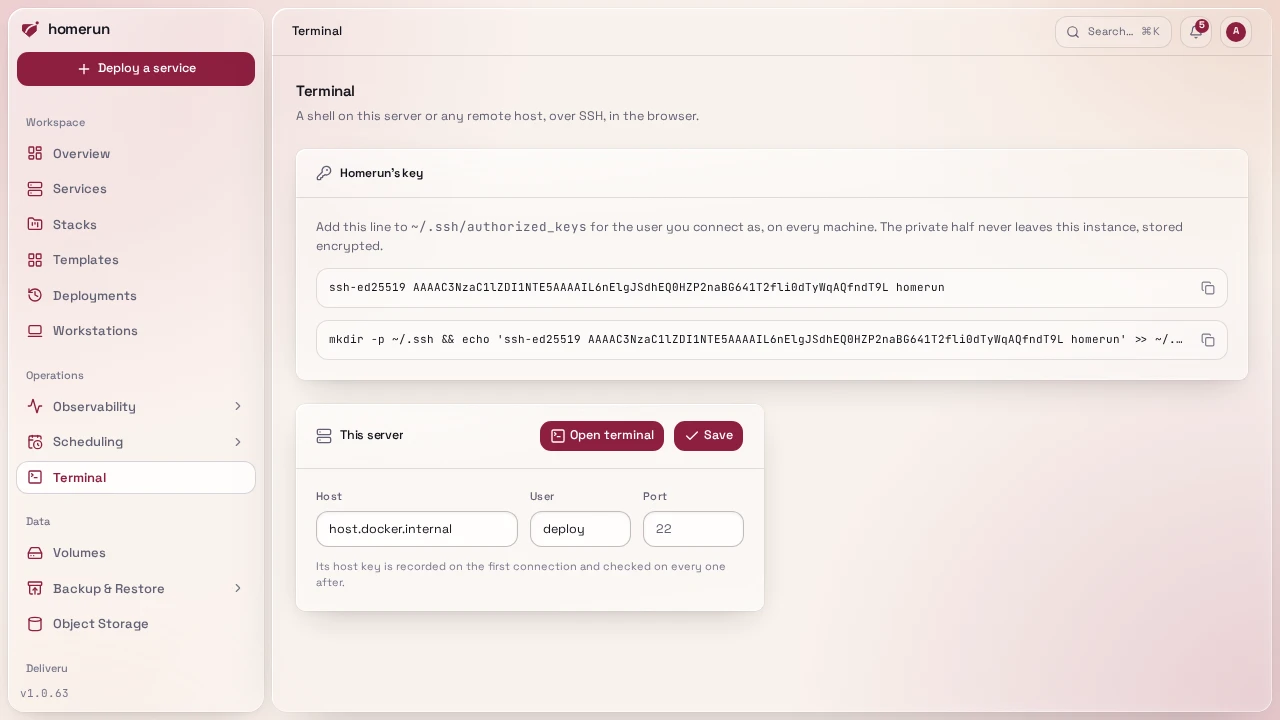
Terminal in the sidebar (Infrastructure, needs write access to System) opens a shell on the machines themselves, in the browser: this server and every remote host. It's SSH from Homerun's worker, so the machine only needs an SSH server and Homerun's public key. A service's own container has its own Terminal tab, see Observability.
#Setting it up
- Open Terminal. The first visit generates Homerun's SSH key pair (ed25519). The private half stays on the instance, encrypted like every other secret.
- Copy the public key, or the one-line install command under it, and run it as
the user you want to connect as on each machine. It appends the key to that
user's
~/.ssh/authorized_keys. - On the machine's card, fill in Host, User and, if it isn't 22, Port, then Save. Open terminal appears once both host and user are set.
For This server, the connection starts inside the worker container, so
localhost is the container itself. Use host.docker.internal, which the
installer's compose file points at the host. A remote host takes the address the
worker can reach it on, the same one you'd ssh to.
#Host keys
The first connection records the key the machine presents, and every connection after that must present the same one. If it doesn't, the terminal refuses to open ("the machine's host key changed") rather than hand your session to whatever answered. The card shows the key it trusts.
After you reinstall a machine or regenerate its host keys, clear the card's host, save, then put the host back and save again: changing the host forgets the recorded key, and the next connection records the new one.
#What to expect
- The shell is the user's login shell on a real PTY (
xterm-256color), resized with the browser window.sudo,htop,vimand friends work. - An idle session closes after 15 minutes, like a container terminal. Closing the tab ends the shell.
- Only accounts with write access to System see the page, and a session is only readable by the user who opened it.
- "The machine refused Homerun's key" means the key isn't in that user's
authorized_keysyet, or the file's permissions are too open forsshd.
#Git over SSH
Pushing to a self-hosted Gitea or GitLab over SSH is a published port on that
service, not a machine terminal: publish its SSH port on the host (for example
2222 → 22) and tell the app which port it's reachable on. See
Published ports.
This guide lives in the project repo: edit it there, and this page follows with the next release.