Homerun
A self-hosted, single-user PaaS for deploying Docker containers with a click-config form: a minimal Dokploy / Cloud Run alternative for your own hardware.
Point at an image (or a git repo), fill in env vars / port / resources, hit
deploy: Traefik routes it to <slug>.yourdomain.com with TLS, automatically.
Single host, local Docker socket, no Kubernetes, no multi-node orchestration to
babysit.
Status: Actively developed, running on real hardware, but still finding its shape: see
docs/faq-and-limitations.mdfor what's solid and what isn't yet.
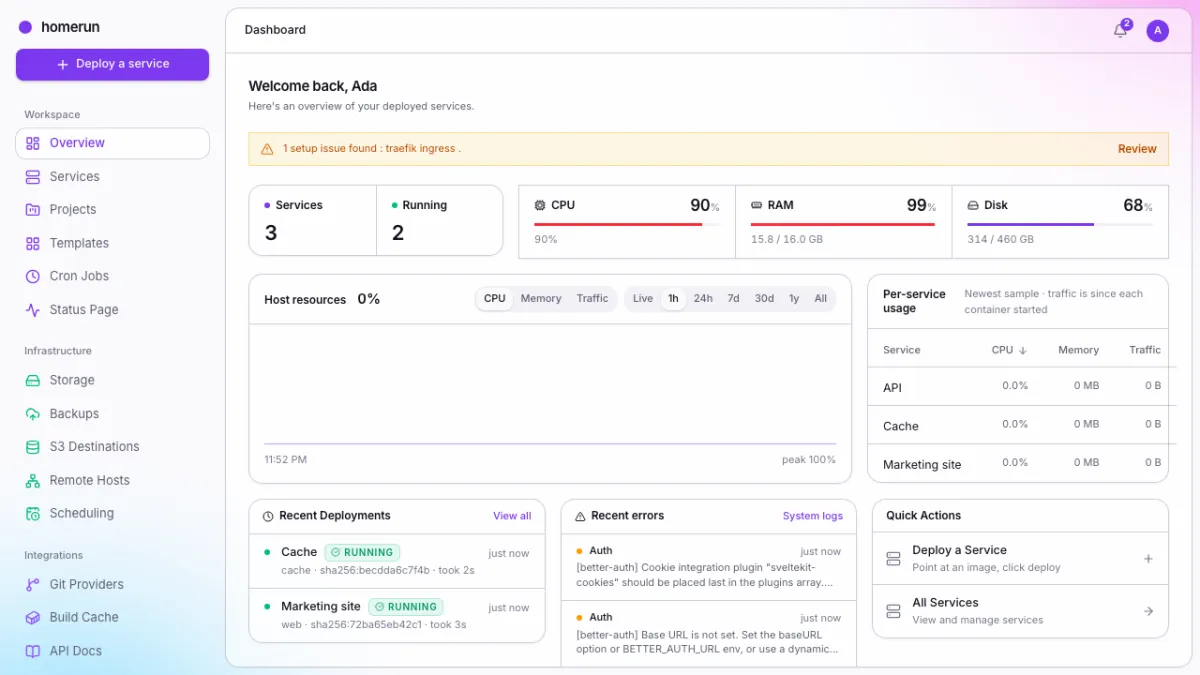
See the full showcase → — every screen, light and dark, generated from a real instance.
Why Homerun
Dokploy, Coolify, and friends are great, but there are stuff I can't get around:
- Coolify has many bugs and a lot of tech debt
- Dokploy has started paywalling features that homelab enthusiasts could use at the benefit of enterprise.
Features
Deploying
- Image or git repo: deploy any Docker image (private registry auth included), or clone a repo by branch, tag or pinned commit and build it on the host, with no registry in between
- Six build methods: a
Dockerfileor a Docker Bake target built with BuildKit (cache mounts, multi-stage,# syntax=), or no Dockerfile at all with Nixpacks, Railpack, Heroku or Paketo buildpacks, builder binaries checksum-verified - Deploy on push: Homerun registers the webhook on your repo for you, and falls back to polling the branch when the git provider can't reach your dashboard (LAN, VPN)
- Pull request previews: every pull request
gets its own
<slug>-pr-<n>service, redeployed on each push and deleted on merge or close, with forks never previewed - Required status checks: a git service waits for the CI checks you pick to pass, then builds exactly the commit they passed on
- Build servers & build cache:
compile on another Docker daemon (
tcp://,ssh://or the lightweight Homerun Agent), and share BuildKit layer cache through a registry - Live deploy progress: pull/build/create/start streamed to the UI in real time, and it resumes if you reload mid-deploy or the deploy started somewhere else
- Zero-downtime, health-gated redeploys: the new container starts next to the old one and only gets traffic once it's ready (its healthcheck, the image's, or a port check Homerun adds itself); a new copy that never comes up is removed and the old one keeps serving
- Revisions & rollback: every deploy recorded with its image digest, commit and full log; redeploy any earlier revision's exact image, with opt-in auto-rollback when a new one turns unhealthy
- Image scanning: every deploy scanned with Trivy through a local registry mirror before it starts, so the container runs exactly what was scanned, with an admin policy that blocks deploys at or above a chosen severity (optionally fixable findings only)
- Compose import: paste a
docker-compose.yamland get its services, volumes, runtime options and dependency order as Homerun services, with a preview of anything that doesn't map across - Migrate from Dokploy or Coolify: read another instance's apps, compose stacks and databases (read-only on their side) and recreate them here, builders and start commands included
Running services
- Swarm mode: the installer's default, every service is a Docker Swarm service with replica scaling and load balancing, and more machines join as workers with one command; standalone (one container per service) stays available
- Env vars & env files: key/value rows plus
.envfiles read off the host at each deploy - Smart service links: point a service at an existing Postgres, MySQL, Redis, Mongo, RabbitMQ or HTTP service and get the connection URL, JDBC URL or one variable per value filled in for you
- Runtime options: entrypoint, command, custom labels, and (admin-only) added capabilities, device mappings and privileged mode
- Compute & settings: CPU/memory limits, replicas, restart and pull policies, a healthcheck command, and scanning and auto-rollback per service
- Live logs & a web terminal: tail stdout/stderr or open an interactive shell into a running container from the browser
- The services list: server-side search, filters and paging on every list page, a list/card toggle, and bulk Start/Stop/Restart/Delete with a typed confirmation before anything destructive
Stacks & templates
- Stacks: group services on their own private Docker
network so they reach each other by slug (
http://api:8080), with prefixed subdomains and one-step delete of the whole stack - ~70 built-in templates: Jellyfin, the *arr stack, Pi-hole, Vaultwarden, Grafana, Uptime Kuma, PostgreSQL, Redis, n8n and more, with bundled app logos, one-click Quick Deploy, and a details page that pulls in the project's GitHub README, stars and latest release
- Linked containers: companions
deploy with the primary (WordPress brings MySQL), and env vars like
{{db.POSTGRES_PASSWORD}}wire them together without retyping - Custom templates: save any service's config as your own template, or build one from scratch
Networking & domains
- Automatic routing & TLS: Traefik routes every service to
<slug>.<baseDomain>with a certificate, with no host ports published - Domains & SSL: any number of extra hostnames per service, each with its own router, plus bring-your-own cert/key for domains outside Traefik's automatic ACME coverage
- Host networking: for apps that need the host's network directly (mDNS/SSDP discovery)
- DNS automation: Cloudflare CNAMEs or Pangolin resources created and removed as services come and go, and Homerun can run the Pangolin Newt tunnel client for you, set up straight from onboarding
- Per-app login wall: put any deployed service behind a Homerun login (passkeys and 2FA included) through Traefik forwardAuth
Storage & backups
- Storage volumes: bind mounts or Docker-managed volumes defined once, mounted into one or more services, read-write or read-only
- S3 backups: scheduled or
on-demand backups of both volume kinds to any S3-compatible endpoint, with
optional service stop or a pre-backup command (
pg_dump,mysqldump) for consistent database copies - Restore from the dashboard: browse a volume's backups in the bucket and restore one, optionally wiping the volume first, with a searchable history of every run
Observability & notifications
- Uptime probes: every service probed every minute from the Docker network and from its public hostname, with failure reasons and fix hints
- Status pages: private or public uptime pages for every service, one stack, or services you pick
- Resource history: live and historical CPU, memory, disk, network and NVIDIA GPU usage for the host and each service, kept for a year, plus top consumers per instance and per stack
- Errors in context: failed deploys and the warnings Homerun logged about a service, on that service's page, with crash and "container is gone" banners
- Notifications: an in-app bell, plus Discord, Slack, Telegram, webhook and email channels subscribed to build, deploy, update, rollback, scan and up/down events, retried when delivery fails
Scheduling
- Scheduled redeploys: cron-style auto-redeploy per service to pick up new images
- Cron jobs: a throwaway container, or an admin-only command on the host itself, on a schedule, with exit codes and output kept per run
- The Scheduling page: every cron redeploy, job and backup schedule, plus the live job queue, on one page
Users & security
- Roles & invites: admin, developer and read-only roles, email or direct-create invites, and a resource pool the whole team shares
- OAuth/OIDC sign-in: one-click presets for Pocket ID, Keycloak, Authelia, Authentik, Logto, Zitadel and Kanidm
- Passkeys & two-factor: which an admin can require for every account
- Sign in with Homerun: Homerun is an OpenID Connect provider too, so the apps you host (Grafana, Gitea, Outline, Immich…) log in with your Homerun accounts, passkeys and 2FA rules
- Git provider accounts: connect GitHub, GitLab, self-hosted Gitea or Bitbucket and pick a repo and branch instead of pasting URLs
- API keys: full-access or read-only,
created by hand or through
homerun login - Hands off everything else: every container is labeled
homerun.managed=true, and Homerun never touches anything it didn't create (Docker Cleanup being the one deliberate exception)
API & CLI
- REST API & OpenAPI: everything in the dashboard is
also a typed JSON API (
/api/v1), authenticated by session or API key, with a live Swagger UI - The
homerunCLI: a small (~6MB) standalone Go binary, logs in through a device-code flow and updates itself
Install & operations
- One-line installer: Docker, a swarm manager, Traefik, Postgres and Homerun on a fresh Linux box in one command, or rootless Docker if you'd rather, and a rootless-to-rootful migration for older installs
- First-run wizard: configure
base domain, email, sign-in and DNS in the dashboard, with no config file to
maintain, and an
optional
homerun.yamlif you want config as code - One-click self-update: to the latest release, straight from the sidebar
- Setup diagnostics: a banner that deep-links to the exact setting that's wrong
- System logs: live logs of Traefik, Postgres and Homerun itself, with Traefik restart and update buttons
- Docker Cleanup: admin-only
docker system df/prune from the dashboard with a preview before anything goes, plus automatic garbage collection of the scan mirror - Registry: turn the internal image mirror into a real
private registry,
docker pushincluded, with push/pull tokens and an optional public hostname through Traefik ⌘Ksearch: jump to any page, or to anything on the instance, from anywhere- Appearance: light/dark/system theme, sidebar intensity and a custom accent color per account
Configuration
You configure Homerun from its own dashboard. The installer sets up everything
the container needs to boot and then hands you a first-run wizard; after that,
base domain, Docker, Traefik, email, sign-in methods, DNS automation and
orchestration mode are all settings pages. There's no config file to maintain,
just AUTH_SECRET and ORIGIN if you're running docker compose by hand
instead of using the installer — an optional homerun.yaml file mirrors every
setting for config-as-code setups, with a dashboard change always winning over
the file. See docs/configuration.md.
Documentation
docs/ in this repo is the source of truth, plain Markdown,
readable straight from the file browser. Start with
Getting started. The
website renders the same files.
Sub-projects
Three standalone tools live under cmd/ alongside the main app, each compiling
to its own binary. All three are Go packages sharing one go.mod at the repo
root, not part of the SvelteKit build:
cmd/worker/: the Go worker that runs Homerun's Docker access and background jobs next to the app; run standalone with noDATABASE_URL, the same binary becomes a small token-authenticated HTTP server that lets a second machine build images for this one, without exposing its Docker daemon (agent mode)cmd/installer/: the one-liner installer used above (Docker as a swarm manager, or rootless, plus the agent or full stack, and--migrate-to-rootfulfor older rootless installs)cmd/cli/: a CLI (homerun services deploy <id>, etc.) against the REST API
This guide lives in the project repo: edit it there, and this page follows within a day.