Bercail
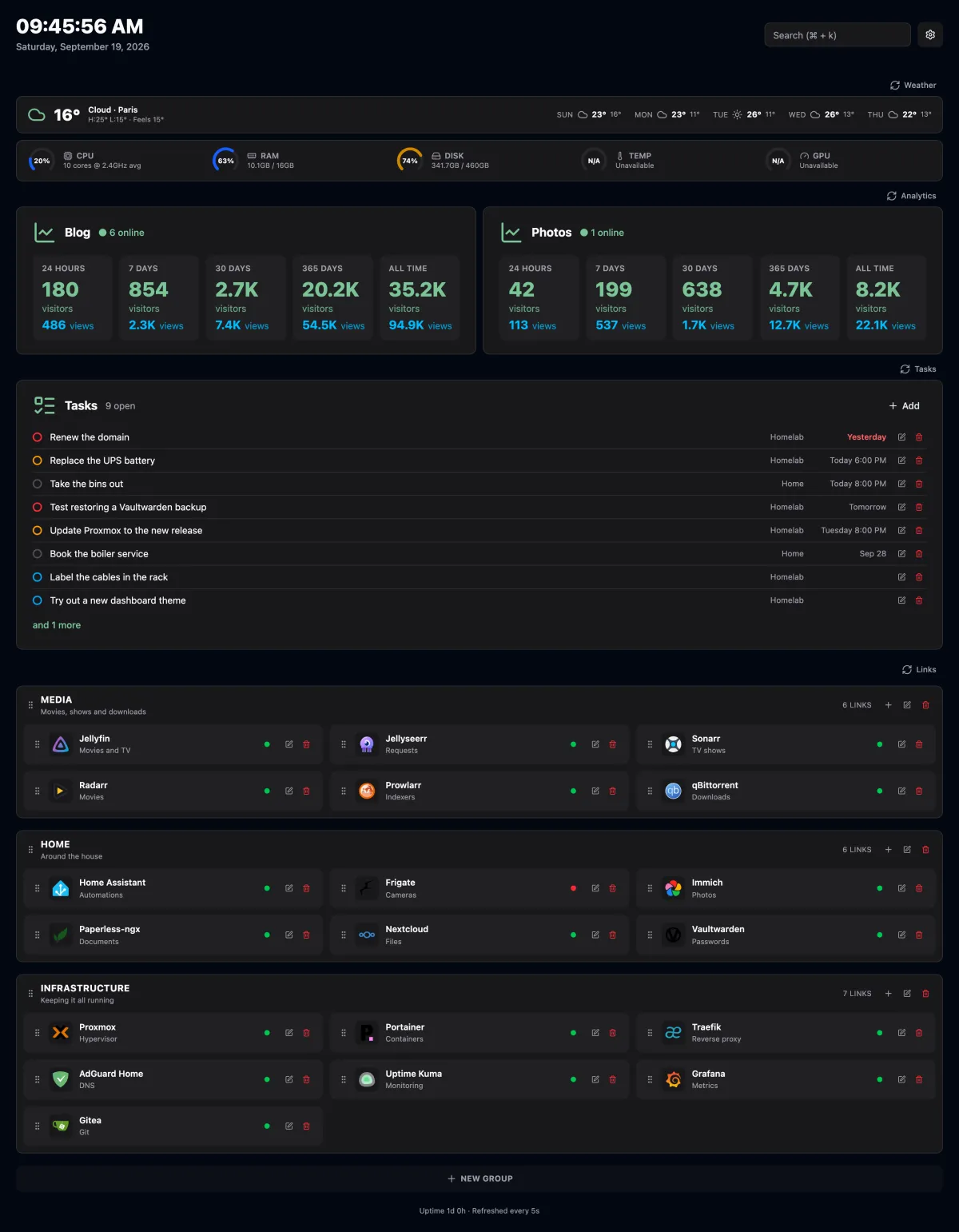
A self-hosted start page for your homelab. It shows the weather and your server's vitals at the top, and your links below, each with a live online/offline indicator.
Features
- Links in groups. Each link has a title, description, URL, target (same or new tab) and an icon, either an image URL or a name from Dashboard Icons. Drag a link by its grip to reorder it or move it to another group.
- Online status. The server sends a
HEADrequest to every link (5 second timeout, cached for 30 seconds). Any response below 500 counts as online. Self-signed certificates are accepted. - Weather. Current conditions and a 5-day forecast from Open-Meteo, no API key needed.
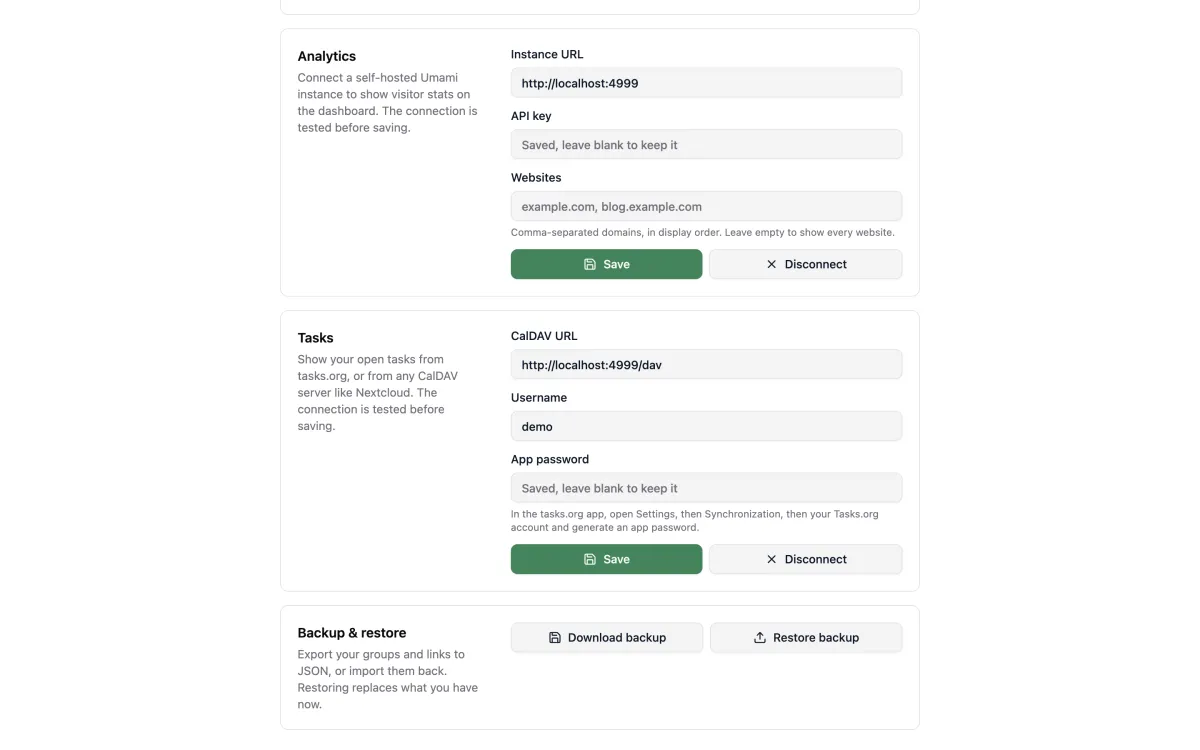
- Analytics. Live visitors, plus visitors and pageviews over 24 hours, 7, 30 and 365 days and all time per website from a self-hosted Umami v3 instance. Connect it in Settings with the instance URL and an API key.
- Tasks. Your open tasks from tasks.org or any CalDAV server (Nextcloud, Radicale, ...), soonest due first, with overdue ones in red. Connect it in Settings with the CalDAV URL, your username and an app password. Read-only.
- System stats. CPU, RAM, disk, temperature and GPU gauges for the host the app runs on.
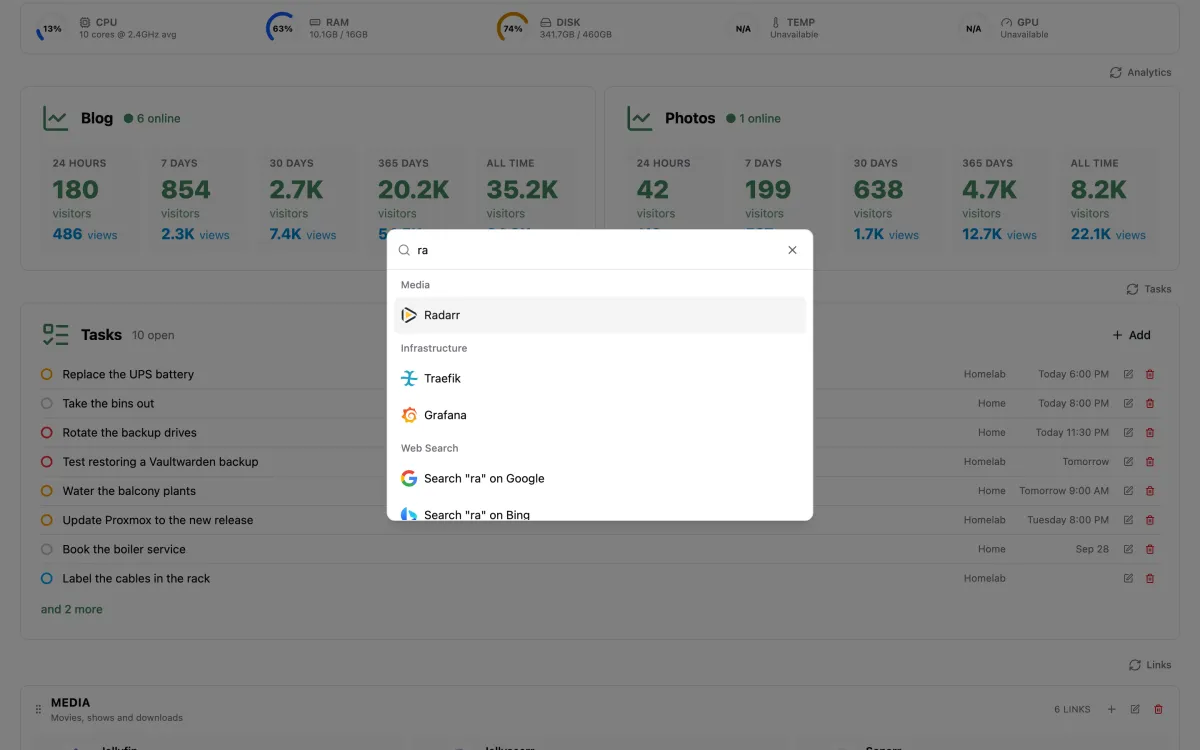
- Search.
Cmd+K/Ctrl+Kopens a palette to jump to any link or search the web. - Backup and restore. Export your groups and links to JSON from Settings, and import them back.
- Light, dark and system themes.
The page refreshes its stats every 5 seconds.
Running with Docker Compose
services:
  bercail:
    image: orochibraru/bercail:latest
    restart: unless-stopped
    environment:
      ORIGIN: 'https://dash.example.com'
    ports:
      - '3000:3000'
    volumes:
- ./data:/app/dataData lives in a SQLite file under /app/data. Database migrations run automatically on startup.
Configuration
Everything is optional. For local development, copy .env.example to .env.
| Variable | Default | Description |
|---|---|---|
ORIGIN | none | Public URL of the app. Set it in production, forms fail without it behind a reverse proxy. |
PORT | 3000 | Port the server listens on. |
HOST | 0.0.0.0 | Address the server binds to. |
DB_FILE_NAME | data/db.sqlite | Path to the SQLite database. |
PUID / PGID | 10001 | Docker only. The uid/gid the server runs as. The data volume is chowned to match on startup. |
DISK_STATS_PATH | /System/Volumes/Data on macOS, / elsewhere | Filesystem the disk gauge reports on. |
WEATHER_LAT | none | Latitude for the weather. A location picked in Settings takes precedence. |
WEATHER_LON | none | Longitude for the weather. Must be set together with WEATHER_LAT. |
WEATHER_LOCATION_NAME | Home | Label shown for the location set through the variables above. |
WEATHER_UNITS | celsius | celsius or fahrenheit. |
OIDC_ISSUER | none | Issuer URL of your OpenID Connect provider. Setting it turns sign-in on. |
OIDC_CLIENT_ID | none | Client ID. Required with OIDC_ISSUER. |
OIDC_CLIENT_SECRET | none | Client secret. Required with OIDC_ISSUER. |
OIDC_ALLOWED_EMAILS | none | Comma-separated emails allowed to sign in. Unset lets in anyone the provider signs in. |
Weather location
The first of these that is set wins:
- A city picked in Settings.
WEATHER_LATandWEATHER_LON.- The browser's location, if you allow it. This one is not saved on the server.
Sign-in
Without OIDC_ISSUER the app is open to anyone who can reach it. With it, every page asks for a
sign-in through your provider (Pocket ID, Authentik, Authelia, Keycloak, ...). Register a
confidential client with the redirect URL <ORIGIN>/auth/callback. Sessions last 30 days and
renew while in use.
Set OIDC_ALLOWED_EMAILS unless the provider already restricts who can use this client. With a
provider anyone can sign up to, leaving it unset lets anyone in.
Host metrics
- Temperature is read from
/sys/class/thermalon Linux. On macOS it needsosx-cpu-temp(brew install osx-cpu-temp). - GPU usage needs
nvidia-smion the host.
A metric that can't be read shows N/A without affecting the others.
New tab extension
The extension in extension/ shows your Bercail instance on every new tab.
- Download
bercail-extension-X.Y.Z.zipfrom the latest release and unzip it. To build it yourself, runbun run package:extension, which writesdist/bercail-extension.zip. - In Chrome, open
chrome://extensions, turn on Developer mode, then Load unpacked and pick the unzipped folder. - Open a new tab and set your Bercail URL, then allow access to that site when asked. With sign-in on, you sign in once in the tab that opens. When the session expires, a new tab sends you back to the sign-in page.
If you put Bercail behind an auth proxy (Pangolin, Cloudflare Access) instead of using its own
sign-in, let /service-worker.js through without auth. Browsers fetch that file without cookies,
so otherwise the cache never installs.
After the first visit the page is served from a service worker cache, so new tabs open without waiting on the server.
Development
Requires Bun. prek comes in as a dev dependency.
bun install   # also installs the git hooks
bun dev| Command | What it does |
|---|---|
bun run check | Type check |
bun run lint | Lint with Biome |
bun run lint:fix | Lint and apply fixes |
bun run format | Format TypeScript, Svelte and Markdown |
bun run test | Run the test suite |
bun run screenshots | Regenerate the screenshots in docs/images/ |
bun x prek run -a | Run every git hook against the whole repository |
The hooks format, lint, type check and test on commit, scan for secrets and typos, and require Conventional Commits messages.
Stack
SvelteKit 3 (prerelease) on Bun with remote functions, SQLite with Drizzle ORM, Tailwind CSS and shadcn-svelte components.
Releases
Every merge to main goes through releaser. A
feat, fix, perf, refactor or docs commit cuts a patch release: it updates
CHANGELOG.md, tags vX.Y.Z, creates the GitHub release with bercail-extension-X.Y.Z.zip attached,
and publishes the image under that tag and latest. Pull requests publish a pr-<number> image,
and their titles must be Conventional Commits because the squash merge uses them as the commit
message.
This guide lives in the project repo: edit it there, and this page follows within a day.