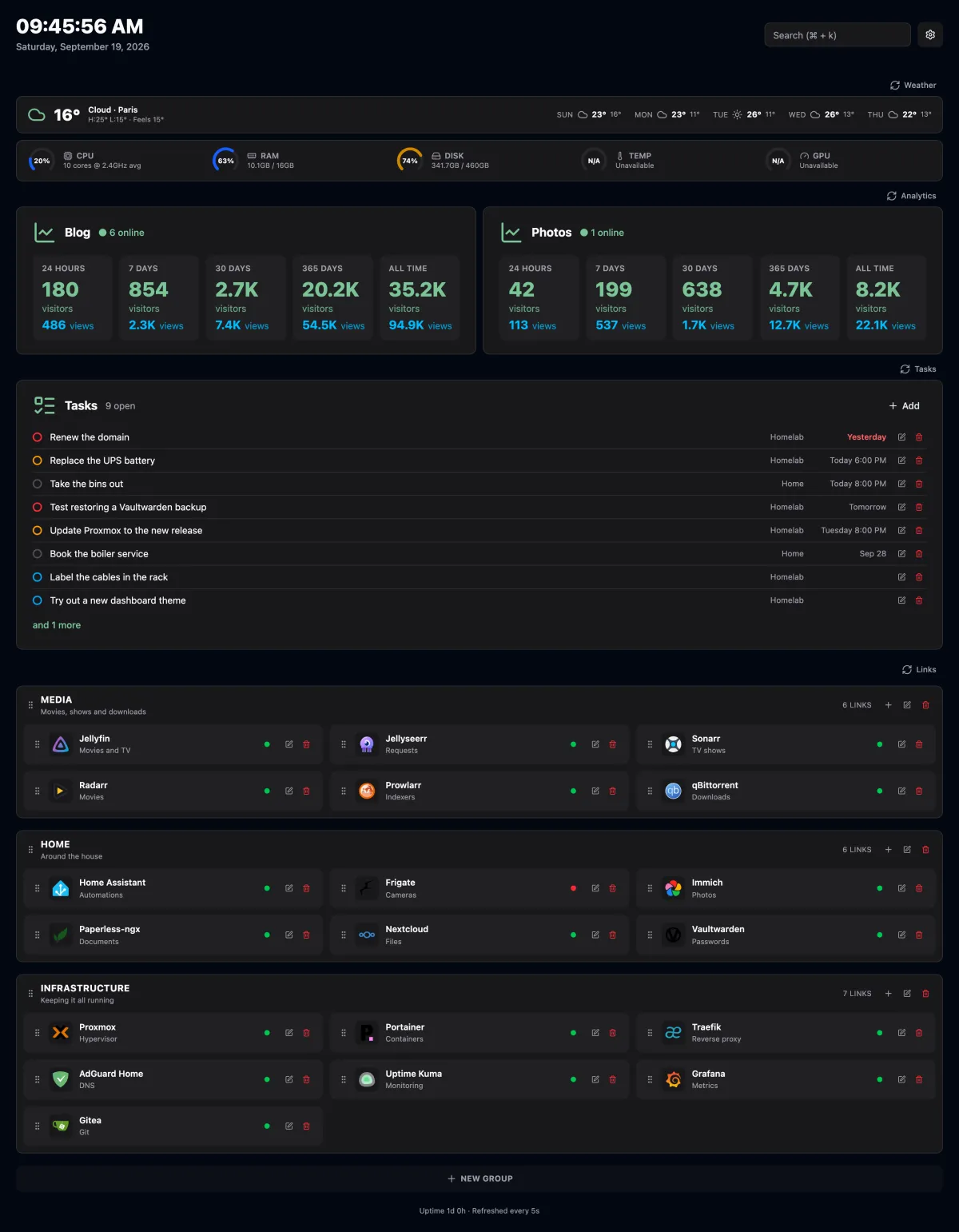
> A self-hosted start page for your homelab. It shows the weather and your server's vitals at the top, and your links below, each with a live online/offline indicator.
> Source: https://orochibraru.com/bercail/docs/readme · Site index: https://orochibraru.com/llms.txt
# Bercail
A self-hosted start page for your homelab. It shows the weather and your server's vitals at the
top, and your links below, each with a live online/offline indicator.
## Features
- **Links in groups.** Each link has a title, description, URL, target (same or new tab) and an
icon, either an image URL or a name from [Dashboard Icons](https://dashboardicons.com/icons).
Drag a link by its grip to reorder it or move it to another group.
- **Online status.** The server sends a `HEAD` request to every link (5 second timeout, cached
for 30 seconds). Any response below 500 counts as online. Self-signed certificates are accepted.
- **Weather.** Current conditions and a 5-day forecast from
[Open-Meteo](https://open-meteo.com/), no API key needed.
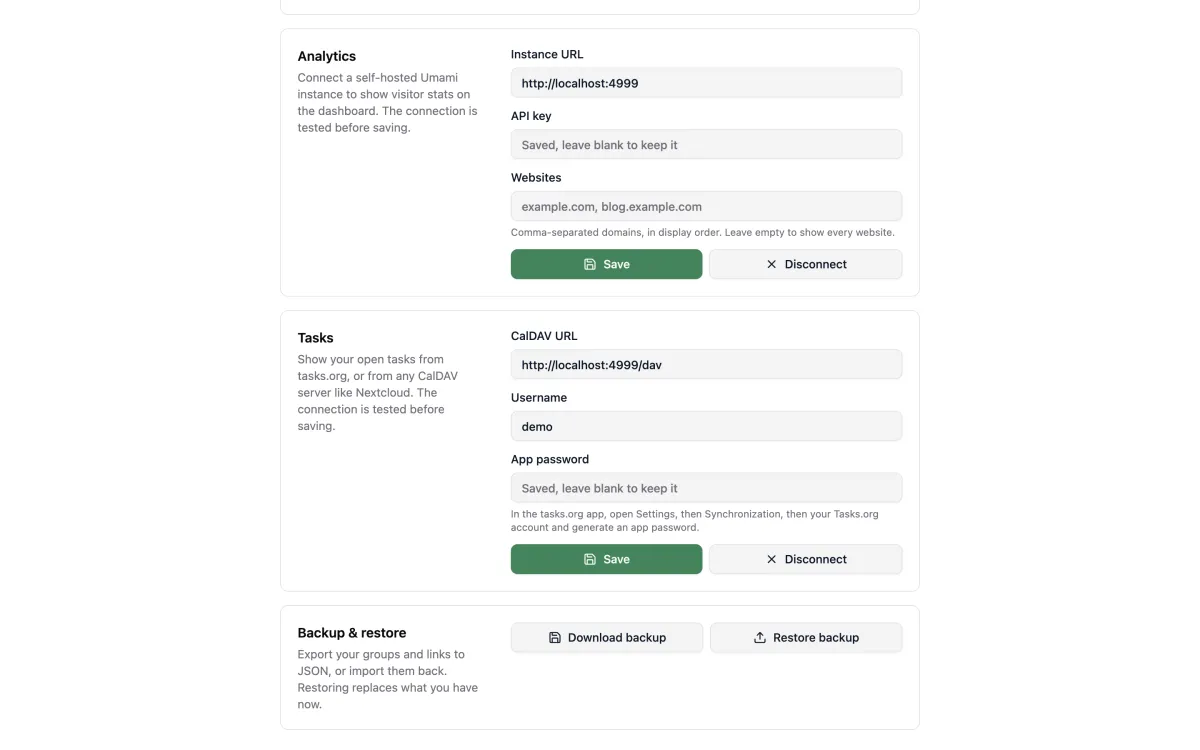
- **Analytics.** Live visitors, plus visitors and pageviews over 24 hours, 7, 30 and 365 days and
all time per website from a self-hosted [Umami](https://umami.is/) v3 instance. Connect it in
Settings with the instance URL and an API key.
- **Tasks.** Your open tasks from [tasks.org](https://tasks.org/) or any CalDAV server (Nextcloud,
Radicale, ...), soonest due first, with overdue ones in red. Connect it in Settings with the
CalDAV URL, your username and an app password. Read-only.
- **System stats.** CPU, RAM, disk, temperature and GPU gauges for the host the app runs on.
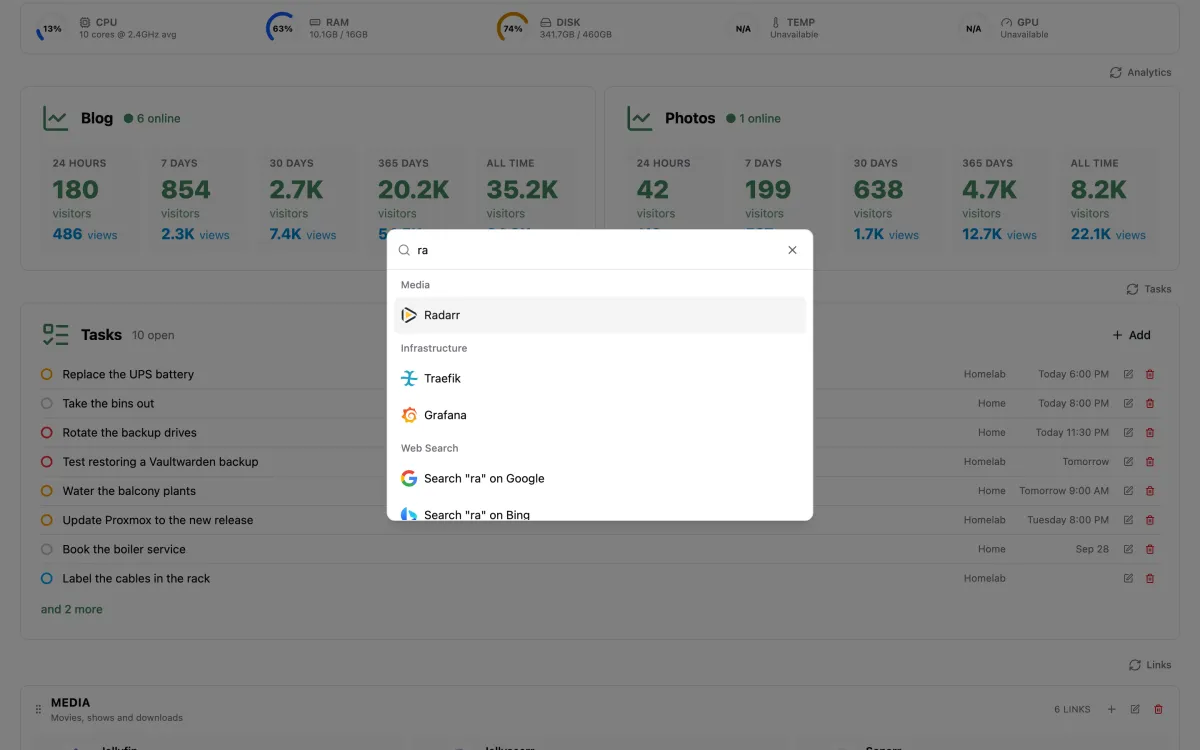
- **Search.** `Cmd+K` / `Ctrl+K` opens a palette to jump to any link or search the web.
- **Backup and restore.** Export your groups and links to JSON from Settings, and import them back.
- **Light, dark and system themes.**
The page refreshes its stats every 5 seconds.
## Running with Docker Compose
```yaml
services:
bercail:
image: orochibraru/bercail:latest
restart: unless-stopped
environment:
ORIGIN: 'https://dash.example.com'
ports:
- '3000:3000'
volumes:
- ./data:/app/data
```
Data lives in a SQLite file under `/app/data`. Database migrations run automatically on startup.
## Configuration
Everything is optional. For local development, copy [`.env.example`](https://github.com/orochibraru/bercail/blob/main/.env.example) to `.env`.
| Variable | Default | Description |
| ----------------------- | ---------------------------------------------- | -------------------------------------------------------------------------------------------- |
| `ORIGIN` | none | Public URL of the app. Set it in production, forms fail without it behind a reverse proxy. |
| `PORT` | `3000` | Port the server listens on. |
| `HOST` | `0.0.0.0` | Address the server binds to. |
| `DB_FILE_NAME` | `data/db.sqlite` | Path to the SQLite database. |
| `PUID` / `PGID` | `10001` | Docker only. The uid/gid the server runs as. The data volume is chowned to match on startup. |
| `DISK_STATS_PATH` | `/System/Volumes/Data` on macOS, `/` elsewhere | Filesystem the disk gauge reports on. |
| `WEATHER_LAT` | none | Latitude for the weather. A location picked in Settings takes precedence. |
| `WEATHER_LON` | none | Longitude for the weather. Must be set together with `WEATHER_LAT`. |
| `WEATHER_LOCATION_NAME` | `Home` | Label shown for the location set through the variables above. |
| `WEATHER_UNITS` | `celsius` | `celsius` or `fahrenheit`. |
| `OIDC_ISSUER` | none | Issuer URL of your OpenID Connect provider. Setting it turns sign-in on. |
| `OIDC_CLIENT_ID` | none | Client ID. Required with `OIDC_ISSUER`. |
| `OIDC_CLIENT_SECRET` | none | Client secret. Required with `OIDC_ISSUER`. |
| `OIDC_ALLOWED_EMAILS` | none | Comma-separated emails allowed to sign in. Unset lets in anyone the provider signs in. |
### Weather location
The first of these that is set wins:
1. A city picked in Settings.
2. `WEATHER_LAT` and `WEATHER_LON`.
3. The browser's location, if you allow it. This one is not saved on the server.
### Sign-in
Without `OIDC_ISSUER` the app is open to anyone who can reach it. With it, every page asks for a
sign-in through your provider (Pocket ID, Authentik, Authelia, Keycloak, ...). Register a
confidential client with the redirect URL `/auth/callback`. Sessions last 30 days and
renew while in use.
Set `OIDC_ALLOWED_EMAILS` unless the provider already restricts who can use this client. With a
provider anyone can sign up to, leaving it unset lets anyone in.
### Host metrics
- **Temperature** is read from `/sys/class/thermal` on Linux. On macOS it needs
[`osx-cpu-temp`](https://github.com/lavoiesl/osx-cpu-temp) (`brew install osx-cpu-temp`).
- **GPU** usage needs `nvidia-smi` on the host.
A metric that can't be read shows `N/A` without affecting the others.
## New tab extension
The extension in `extension/` shows your Bercail instance on every new tab.
1. Download `bercail-extension-X.Y.Z.zip` from the latest release and unzip it. To build it yourself,
run `bun run package:extension`, which writes `dist/bercail-extension.zip`.
2. In Chrome, open `chrome://extensions`, turn on Developer mode, then **Load unpacked** and pick
the unzipped folder.
3. Open a new tab and set your Bercail URL, then allow access to that site when asked. With
sign-in on, you sign in once in the tab that opens. When the session expires, a new tab sends
you back to the sign-in page.
If you put Bercail behind an auth proxy (Pangolin, Cloudflare Access) instead of using its own
sign-in, let `/service-worker.js` through without auth. Browsers fetch that file without cookies,
so otherwise the cache never installs.
After the first visit the page is served from a service worker cache, so new tabs open without
waiting on the server.
## Development
Requires [Bun](https://bun.sh). [prek](https://prek.j178.dev/) comes in as a dev dependency.
```bash
bun install # also installs the git hooks
bun dev
```
| Command | What it does |
| --------------------- | ----------------------------------------------- |
| `bun run check` | Type check |
| `bun run lint` | Lint with Biome |
| `bun run lint:fix` | Lint and apply fixes |
| `bun run format` | Format TypeScript, Svelte and Markdown |
| `bun run test` | Run the test suite |
| `bun run screenshots` | Regenerate the screenshots in `docs/images/` |
| `bun x prek run -a` | Run every git hook against the whole repository |
The hooks format, lint, type check and test on commit, scan for secrets and typos, and require
[Conventional Commits](https://www.conventionalcommits.org/) messages.
### Stack
SvelteKit 3 (prerelease) on Bun with [remote functions](https://svelte.dev/docs/kit/remote-functions), SQLite with Drizzle ORM, Tailwind CSS and
[shadcn-svelte](https://shadcn-svelte.com/) components.
## Releases
Every merge to `main` goes through [releaser](https://github.com/orochibraru/releaser). A
`feat`, `fix`, `perf`, `refactor` or `docs` commit cuts a patch release: it updates
`CHANGELOG.md`, tags `vX.Y.Z`, creates the GitHub release with `bercail-extension-X.Y.Z.zip` attached,
and publishes the image under that tag and `latest`. Pull requests publish a `pr-` image,
and their titles must be Conventional Commits because the squash merge uses them as the commit
message.